Custom Software vs Off-the-Shelf: Pros and Cons for 2026
Jowena BorralDigital Marketing Specialist

A low upfront price doesn’t always make software the lower-cost choice over time. The custom software vs off-the-shelf pros and cons go beyond purchase price: they include how well a solution fits your workflows, connects with existing systems and can be supported as your business changes.
Off-the-shelf software can help you get started quickly, especially when your needs are standard. But if your team has to work around the product, those workarounds can add manual effort and affect the experience for staff or customers. Custom development can support processes that set your business apart, but it also brings responsibility for delivery, maintenance and ongoing improvement.
The right choice depends on your requirements, your users and the ownership model your organisation can sustain. This article compares the practical trade-offs of buying, configuring and building software, including subscriptions, integrations, support and future changes. You’ll also see where a blended approach may make sense: use established products for common functions, and consider custom software where a tailored workflow could deliver meaningful business value. The aim is to help you make a considered decision, not commit to more technology than you need.
Key Takeaways
- Start with the business outcome you need, then decide whether to adapt your processes to a product or shape software around your requirements.
- Use the custom software vs off-the-shelf pros and cons to assess workflow fit, flexibility and the compromises each option may involve.
- Compare the full ownership picture, including configuration, integration, user readiness, support and future change, not just the initial decision.
- Test whether an off-the-shelf product meets essential requirements without creating costly or high-risk workarounds.
- Before committing, agree on implementation responsibilities, user preparation and success measures that fit your chosen approach.
Custom software vs off-the-shelf: what is the real difference?
The decision is whether to adapt your processes to a product or shape software around your requirements. A ready-made tool may cover common business needs, while a tailored solution can support workflows that distinguish your organisation or connect systems in a specific way. The best fit depends on what your users need to achieve, not simply whether a product is labelled “custom” or “off-the-shelf”.
The Commercial off-the-shelf (COTS) concept describes products developed for general use and then adopted or adapted by purchasers. Custom software, by contrast, is designed and developed to meet specified organisational needs. In practice, the distinction is not always clear-cut: ready-made products can be configured or extended, and custom solutions can rely on existing platforms and services.
What counts as off-the-shelf software?
With off-the-shelf software, you select an existing product and use its available functions and settings. It can be a practical fit when standard capabilities match your needs. Implementation may still involve configuration, data migration, user preparation or integrations with other systems. Licensing, hosting and support also vary by product, so assess the specific terms and responsibilities rather than assuming every tool works the same way.
What makes software custom-built?
Custom software starts with defined requirements. Those requirements guide the design and development of a solution, including workflows or integrations that address a clear business need. Tailoring can reduce reliance on workarounds when a process is important to how your organisation operates. It does not remove the need for ownership: you’ll still need to plan support, maintenance and improvements as users, systems and business priorities change.
This comparison shows the typical distinction. The actual balance depends on the product, implementation and responsibilities agreed with its provider or development partner.
| Area | Off-the-shelf | Custom software |
|---|---|---|
| Fit | Uses existing functions for common needs. | Designed around defined requirements. |
| Configuration | Settings adapt the product within its limits. | Requirements shape the solution’s behaviour. |
| Integration | Depends on available connections or extra work. | Can be planned around specific systems. |
| Ownership | Often involves product terms and provider support. | Requires agreed responsibility for support and maintenance. |
| Change | Changes depend on product capabilities and updates. | Can evolve through planned development. |
So, custom software vs off-the-shelf pros and cons are not simply a choice between “rigid” and “flexible”. Configuration, extensions and integrations can make a ready-made product fit more closely, while a custom solution still needs boundaries and ongoing care. Start by identifying the business outcome and essential requirements. Then compare how each approach would handle the tasks users perform, the systems it needs to connect with and the support it will require. This helps separate a genuine product limitation from a preference for a different process.
Custom software vs off-the-shelf pros and cons for your organisation
Neither approach is automatically faster, cheaper or safer. The better choice is the one that meets your essential needs without creating more complexity than your organisation can support. An existing product may offer a quicker path when its workflows fit. Custom development may be worth considering when a distinctive process, integration requirement or user experience matters enough to justify a tailored solution.
The NIST definition of COTS can help clarify what procurement teams mean by commercial off-the-shelf software. For your decision, look beyond the label: confirm what the product does today, how it connects with your systems and what the provider’s roadmap and support arrangements mean for your users.
Where off-the-shelf software can be a strong fit
An existing product is worth assessing when its available features address your core need with limited adaptation. For example, a standard function such as expense approval may not need a unique workflow if the product already supports your organisation’s approval steps. Test the product with the people who will use it. Ask them to complete typical tasks, such as submitting a request, checking its status and resolving an exception. Then check integration options, planned product changes and support arrangements. A poor fit can shift effort into workarounds and manual handling.
Where custom software can justify the investment
Custom development may be appropriate when available products don’t support a workflow that drives operational value, or when users need a more direct experience across connected systems. A tailored solution can reflect those requirements, but the business case should account for delivery planning, stakeholder time, ongoing support and future changes. Define the problem and success measures first. Then assess whether customisation solves a material need rather than simply reproducing an existing product.
| Approach | Potential advantages | Potential limitations |
|---|---|---|
| Off-the-shelf | May meet standard needs quickly using established functions. | Fit, integrations and changes depend on the product; workarounds may be needed. |
| Custom | Can align workflows and integrations with defined business requirements. | Requires clear scope, delivery oversight and planned support and improvement. |
These trade-offs depend on the product and project. A product with strong configuration and integration options may fit well without custom development. A tailored solution may also use existing platforms or services rather than build every component from scratch. Compare the effort, control and responsibilities involved in your specific case, and involve users who understand the day-to-day process. If you’re weighing a tailored solution against product options, discuss your software requirements with 4mation to clarify the business need before settling on an approach.
Compare total ownership, integration and risk, not just the initial decision
Neither option is automatically simple or risky. An off-the-shelf product may need careful configuration, integration and user preparation before it works well in your organisation. Custom software introduces delivery decisions, but its risks can be managed through clear requirements, agreed scope and planned support. The useful comparison is how each approach fits your operations and what your team must manage over time.
Separate the initial decision from ongoing ownership. A product’s subscription or procurement terms are only part of its impact; implementation, configuration, integration, training and support also take effort. Custom development has delivery responsibilities, followed by maintenance and planned improvements. A total cost of ownership assessment should consider these ongoing commitments alongside how well the software supports the work it is meant to do. For a useful comparison, list the one-off work, recurring responsibilities and internal time needed for each option, then check which assumptions need confirmation from a supplier or delivery partner.
How integration and process fit change the comparison
Map the important workflows and systems before comparing product features. Trace how information moves between teams and tools, then identify repeated data entry, manual workarounds or process constraints. For example, note where staff transfer information between systems, re-enter the same details or wait for another team to complete a step. These are questions to investigate, not automatic reasons to build custom software. Assess whether configuration or available connections can address them, and what effort or risk remains. Where integration is central to the decision, review the organisation’s system integration and software development needs.
What ongoing ownership looks like
Support responsibilities depend on the product, agreement and operating model. Confirm who responds to user issues, maintains integrations, applies updates and assesses future requirements. For custom software, establish how maintenance and improvements will be prioritised after launch. Reviewing ongoing technology support and maintenance as part of planning can help clarify post-launch needs.
- Updates: Confirm who applies product updates or plans changes to custom software, and how updates are tested.
- Support: Agree who handles user questions, technical issues and escalation.
- Integrations: Identify who monitors connections and investigates failures or changes to linked systems.
- Future requirements: Decide who gathers user needs, prioritises improvements and approves changes.
Use this responsibility matrix to expose gaps before committing. In the custom software vs off-the-shelf pros and cons assessment, include internal staff time and decision-making as well as external provider responsibilities. For each task, name an internal owner, identify any provider involvement and clarify who makes decisions when something changes. Clear ownership helps your organisation manage change without assuming that a product provider or development partner will automatically cover every operational need.
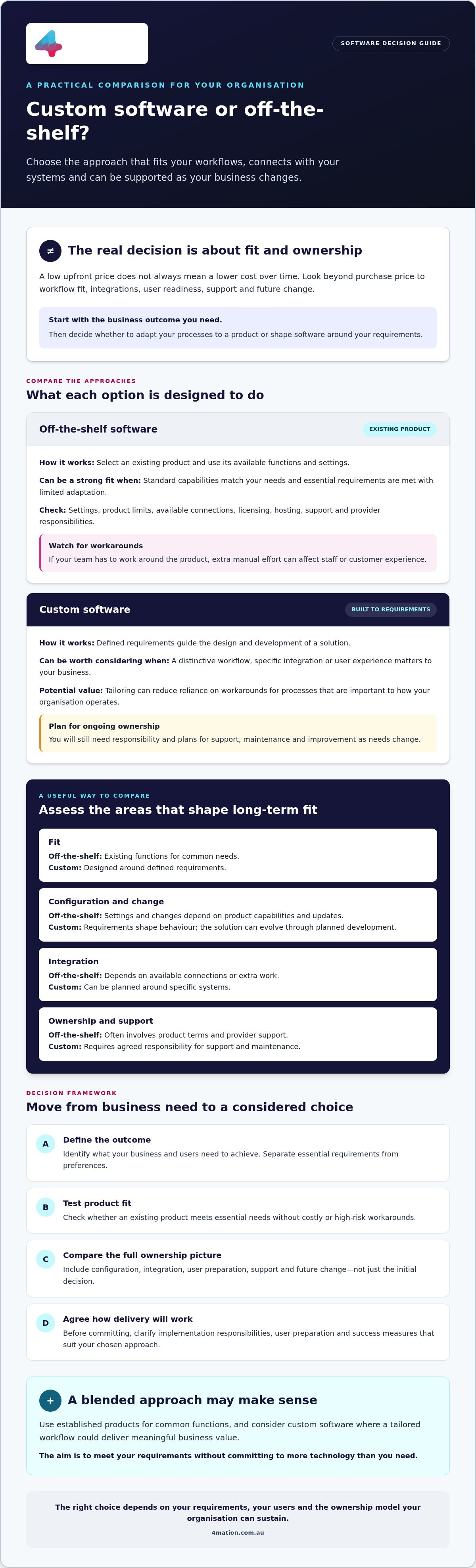
Use this decision framework to choose the right software approach
A sound software decision starts with the business result, not a preferred technology. Use these five steps to compare options against your organisation’s needs, delivery capacity and ability to support the solution over time.
- 1. Define the outcome. State what needs to improve, such as reducing repeated data entry, helping staff complete a process more efficiently or making a service easier for customers to use. Agree how you’ll recognise success.
- 2. Map the workflow. Document who does what, which systems and data they rely on, and where delays or hand-offs occur. Involve the people who perform the work, not only the decision-makers.
- 3. Test product fit. Compare essential requirements with a product’s actual functions. Ask whether users can complete key tasks without unsuitable process changes, manual workarounds or risks to the quality of the outcome.
- 4. Assess ownership. Consider integration, security needs, user adoption, support responsibilities and how the solution can change as requirements evolve. Confirm your organisation has the time and capability to manage its part.
- 5. Decide against the evidence. Choose the approach that best meets the agreed outcomes and can be delivered and sustained. If neither option fits on its own, assess whether a combined approach could address standard needs with existing software and distinct requirements with tailored development.
Questions to ask before choosing off-the-shelf software
Check the product against your real workflows, not just a feature list. Ask: Which essential tasks does it support without forcing unsuitable process changes? Can it connect with the systems and data your organisation needs? Can the supplier explain support arrangements, updates, product direction and relevant limitations? Answers should help you distinguish a manageable compromise from a workaround that undermines the intended benefit.
Questions to ask before commissioning custom software
Be clear about the case for a tailored solution. Are the unmet requirements important enough to justify it? Can stakeholders define the outcomes, intended users, scope and measures of success? Who will own support, maintenance and improvement after launch? If these responsibilities and priorities remain unclear, refine them before committing to development.
Decision matrix
- Lean towards an existing product if it meets essential needs, connects with required systems and users can work effectively within its processes.
- Explore custom development if important requirements remain unmet and a tailored workflow or integration supports a defined business outcome.
- Investigate a combined approach if standard functions are covered by products, but a specific process needs a tailored solution.
- Pause and clarify if outcomes, ownership, security needs or support capacity are not yet clear.
This framework makes the custom software vs off-the-shelf pros and cons specific to your organisation rather than relying on a universal rule. To assess the options against your goals and workflows, discuss your software requirements with 4mation.
Plan implementation and ongoing support before you commit
A software decision becomes more manageable when you plan how the solution will move from selection to everyday use. Whether you adopt a product or commission custom software, validate requirements, plan implementation, prepare users and assign clear ownership. The approach differs, but both need people, time and decisions from your organisation.
For a product, plan configuration, integrations, data migration where needed, user preparation and support. Confirm who will manage each task, including coordination with the supplier. For custom development, align stakeholders on the scope, users, priorities and measures of success before delivery begins. Clear decisions help the team focus on the business outcome and manage changes in requirements.
How a delivery partner can reduce uncertainty
Discovery helps clarify your business goals, users, workflows and constraints before a solution is selected. Strategy, design and technical planning can then inform a recommendation that fits the organisation, rather than assuming every challenge needs custom development. If you’re considering a tailored build, explore 4mation’s engagement models to understand different ways a project can be structured. A Fixed-Cost project may suit work with a clearly defined scope and agreed outcomes.
Make support and improvement part of the decision
Decide who will manage post-launch support, maintenance and future improvements before implementation. These responsibilities affect how reliably the solution serves users and how your organisation responds as needs change. Include internal owners and any external provider in the plan, and clarify how new requirements will be assessed and prioritised. Ongoing improvement should be an explicit part of ownership, not an assumption made after launch.
Continuous improvement and development may be relevant when a custom solution needs planned changes after release. For more background on tailored solutions, see 4mation’s custom software development guide.
The custom software vs off-the-shelf pros and cons only become meaningful when considered alongside delivery and ownership. Choose the approach that best meets your requirements and that your organisation can support. If you’d like to test the options against your business goals, discuss your software requirements with 4mation.
Choose a software approach you can sustain
The right decision isn’t simply about buying quickly or building something tailored. It’s about matching the solution to your essential requirements, workflows and users, then planning for integration, support and future change. A product that fits standard needs may be the practical choice. Custom development may better serve important processes that existing options don’t support effectively.
Weighing the custom software vs off-the-shelf pros and cons means looking beyond the initial selection. Consider implementation effort, user adoption and who will own maintenance and improvement after launch. These responsibilities shape whether the solution can continue to support your business as it changes.
4mation offers custom software development, system integration and ongoing technology support. The company states it has 25 years of client success, and its Fixed-Cost projects are described as fixed cost, on time, on budget and bug-free. The right engagement depends on your requirements and project context.
To assess which approach fits your goals, workflows and support capacity, discuss your software requirements with 4mation.
Frequently Asked Questions
Is custom software better than off-the-shelf software?
Not necessarily. Custom software can suit important workflows or integration needs that existing products don’t support well. Off-the-shelf software may be a better fit when its standard functions meet your requirements and users can work effectively within its processes. Compare both options against your business outcomes, implementation needs and ongoing support capacity. The right choice is the one your organisation can use and sustain, not the one with the most features.
What are the disadvantages of custom software?
Custom software requires your organisation to define requirements, align stakeholders and make decisions during delivery. You’ll also need to plan for support, maintenance and future improvements after launch. If the scope or success measures aren’t clear, delivery can become harder to manage. A tailored solution is most appropriate when it addresses defined business needs, rather than adding complexity to reproduce functions an existing product already provides.
What are the disadvantages of off-the-shelf software?
An off-the-shelf product may not match every workflow or connect easily with the systems your organisation uses. If the fit is poor, staff may need to change established processes or rely on manual workarounds. You’ll also depend on the product’s available settings, updates and support arrangements. Check these limits alongside the features, and assess whether the product meets essential needs without creating avoidable operational effort.
Can off-the-shelf software be customised?
Often, an off-the-shelf product can be configured using its available settings, and some products support extensions or integrations. The options depend on the specific product and its terms. Before selecting one, confirm what can be changed, whether those changes affect support or future updates, and how integrations will work. Configuration may improve the fit, but it won’t necessarily change the product’s underlying capabilities or accommodate every unique requirement.
How do I decide between custom software and off-the-shelf software?
Start by defining the business outcome, then map the workflows and systems involved. Test available products against essential requirements, user needs, integration, security and support. Ask whether a product can meet those needs without unsuitable process changes or high-risk workarounds. If significant requirements remain unmet, assess whether a tailored solution is justified and whether you can manage its delivery and ongoing ownership. This makes the custom software vs off-the-shelf pros and cons specific to your organisation.
Is custom software more expensive than off-the-shelf software?
It can require a greater initial development investment, while an off-the-shelf product may involve subscription or licensing fees. But the full comparison depends on requirements, configuration, integration, usage, support and future changes. A product that needs extensive workarounds may carry ongoing effort, while custom software needs planned maintenance and improvement. Compare the total ownership responsibilities over the period you expect to use the solution, rather than judging by the initial outlay alone.
About The Author
