Effective Strategies to Review AI-Generated Code Safely
Jowena BorralDigital Marketing Specialist

AI-generated code can pass a test and still solve the wrong problem. To review AI generated code safely, your team needs to check more than whether it runs. A change that misses a business requirement or creates reliability issues can cost time later and affect the people who rely on your systems.
AI assistance can help teams move faster, but reviewers still need to know what to look for and how to avoid turning review into a delivery bottleneck. The answer isn’t to scrutinise every change in the same way. Match the depth of review to the potential impact, and keep a clear human owner accountable for the result.
This article sets out a practical, risk-based approach you can fit into your existing development workflow. You’ll learn how to assess changes against requirements, quality expectations and business needs, then use testing and focused human review to build confidence without adding unnecessary process. The goal is clear evidence that each change is fit for purpose, not simply plausible-looking code.
Key Takeaways
- Start with the ticket, acceptance criteria or user need, then trace how the change affects connected parts of your system.
- Review AI generated code against separate evidence for functionality, security, dependencies and maintainability.
- Scale review effort to the change’s impact on users, sensitive data, integrations and day-to-day operations.
- Use a consistent workflow to assess the change, run checks, involve the right reviewer and record a clear decision.
- Build responsible AI-assisted delivery into your wider software lifecycle with clear standards, ownership and feedback.
Why reviewing AI-generated code protects delivery quality and business outcomes
AI-generated code is code produced or materially changed with help from an AI coding tool. It may be a new feature, a small edit or a suggested fix. Whatever its origin, the change still needs to work in the context of your system and deliver the outcome your business intended. Reviewing it helps protect customer experience, operational continuity and the long-term cost of maintaining software.
AI tools generate code based on the instructions and context they receive. If a requirement is incomplete, or important system behaviour is not visible to the tool, the result can look polished while relying on assumptions that don’t fit your organisation. A careful review checks both the implementation and the reason for the change.
What changes when AI contributes to a software change?
The code may have been written by a developer, suggested by an AI tool or produced through a combination of both. That changes how the work is produced, but not the standard it needs to meet. Reviewers still need to understand the task, the affected system components and the user outcome the change should support.
Consider a booking system that lets customers cancel an appointment. A generated change might correctly remove a booking and pass a basic test, but overlook a rule that prevents cancellation after a cut-off time. The code runs, yet the business rule is missed. Customers could see inconsistent options, staff might need to resolve avoidable disputes, and the team could face extra work correcting the issue.
Reviewing code means more than checking whether it is syntactically correct. Ask whether the change handles relevant conditions, fits existing system behaviour and avoids unnecessary complexity for future development. Automated checks can help identify defects, style issues or security concerns. The Automated Code Review overview explains how these checks support the review process, but they don’t replace understanding the business purpose of a change.
Why a passing build is not the whole review
Tests provide evidence about behaviours someone has defined and included in the test suite. They can confirm that a booking can be cancelled under a particular condition, for example, but they can’t prove that every business rule or unusual situation has been considered. A successful build shows that the software passes its configured checks, not that the change suits every user or operating context.
This matters when the original request is broad. If a ticket says “make cancellations easier” without explaining the cut-off rule, refund handling or staff workflow, an AI tool may produce a technically valid interpretation that conflicts with how the organisation operates. Compare the change with acceptance criteria, user needs and the surrounding system behaviour.
Successful execution shows that code works under defined conditions; review confirms whether those conditions reflect the business intent.
Clear ownership makes that distinction practical. A named human reviewer should be able to explain why the change is appropriate, what evidence supports that decision and who will address issues if the software behaves differently in operation. This accountability protects users and gives the team a sound basis for maintaining the system over time.
Check whether AI-generated code fits the requirement and your system
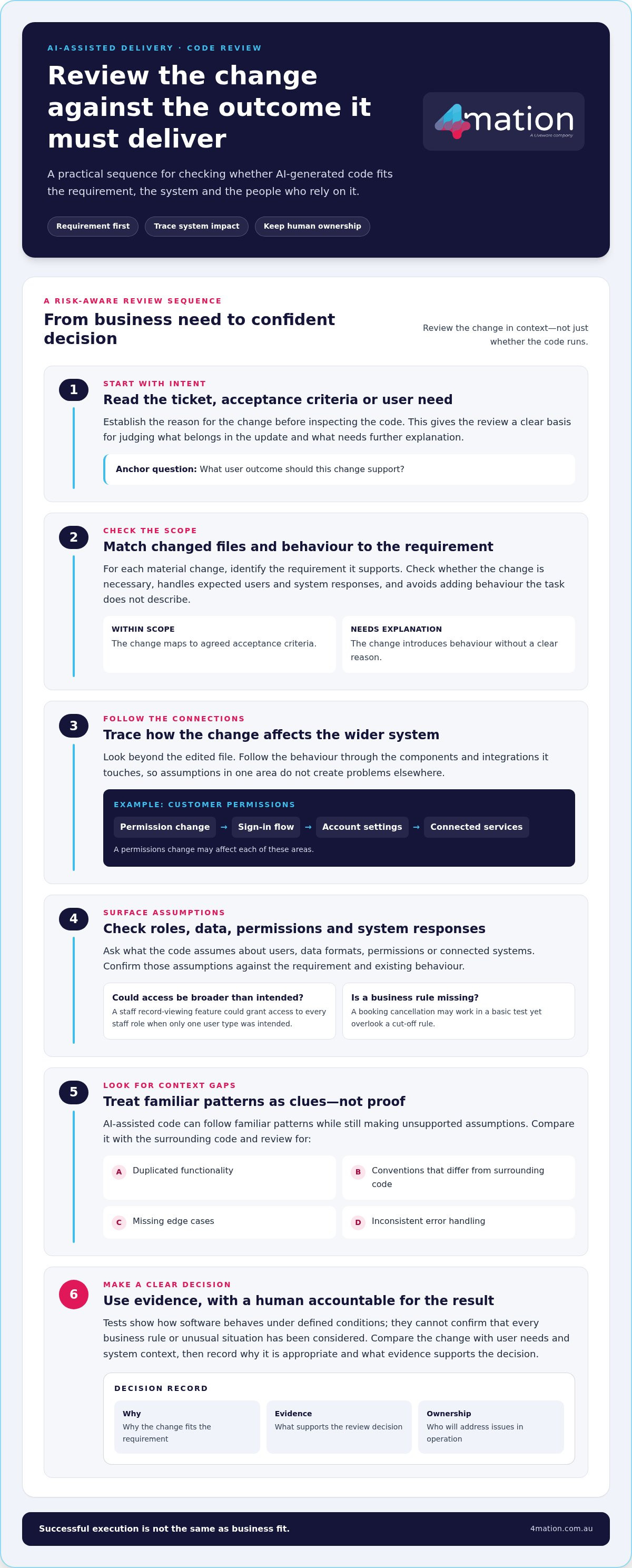
A useful review begins with the reason for the change, not with the code itself. Read the ticket, acceptance criteria or user need, then compare them with the files and behaviour changed. This gives reviewers a clear basis for deciding what belongs in the update and what needs further explanation.
Next, trace the behaviour through the parts of the system it touches. A change to customer permissions, for example, may affect the sign-in flow, account settings and connected services. Reviewing only the edited file can miss an assumption that causes a problem elsewhere. Understanding these relationships helps protect user access and keeps connected processes working as expected.
Trace each code change back to its intended outcome
For each material change, ask what requirement it supports and how it helps deliver the intended user outcome. Check whether it handles the expected users, data and system responses. If it introduces behaviour the task doesn’t describe, establish why it’s needed before accepting it.
- Compare the changed files and behaviour with the agreed acceptance criteria.
- Identify assumptions about user roles, data formats, permissions or responses from connected systems.
- Check whether each change is necessary, or whether it expands the task without a clear reason.
- Trace changes across components and integrations to understand their broader effect.
For example, a task to let staff view a customer record might lead to a change that grants access to every staff role. The feature may work as requested for one user, but the broader permission change could expose information beyond the intended audience. Tracing the behaviour back to the requirement can reveal that gap before it reaches users.
Look for context gaps and AI-specific warning signs
AI-assisted changes can follow familiar coding patterns and still make unsupported assumptions. Look for duplicated functionality, conventions that differ from surrounding code, missing edge cases and inconsistent error handling. Familiarity is a useful clue, not evidence that a change fits the application.
Keep review findings specific. Record the affected behaviour, the requirement or existing pattern it conflicts with, and the consequence you can reasonably identify. For instance, “this path allows a staff role without record access to retrieve the record” is more useful than “the permissions look wrong”. If the evidence doesn’t show a definite defect, describe the uncertainty and request clarification rather than treating a guess as a finding.
These practices align with Effective AI Code Review Practices, which focuses on providing context and assessing findings by risk. Teams setting review expectations for AI-assisted changes can also draw on 4mation’s software delivery experience.
Validate AI-generated code with tests, security checks and maintainability evidence
Once you understand the change, look for evidence that it behaves as intended, protects relevant data and can be maintained by your team. Use the same quality standards you apply to other code, with extra attention to assumptions that may not be obvious from a clean-looking implementation. Automated checks make this work more consistent, but a reviewer still needs to interpret results in context.
| Review area | Evidence to inspect | Business risk addressed |
|---|---|---|
| Functionality | Relevant tests, acceptance criteria and build results | Incorrect behaviour affecting users or operations |
| Security | Permissions, data handling, input validation and error paths | Unauthorised access or inappropriate data exposure |
| Dependencies | Purpose, maintenance status and fit with project standards | Unnecessary technical reliance or future disruption |
| Maintainability | Clear structure, useful tests and consistency with the codebase | Slower changes and higher support effort over time |
Use tests and analysis tools to check defined behaviour
Start with the existing tests that cover the affected area. Check whether the change adds or updates tests for the behaviours the task requires, including relevant error conditions. Review build output, warnings and static-analysis findings as well. A new warning may point to a genuine issue, while an existing warning may be unrelated. The key is to understand what the evidence says about this change.
Test results are evidence about defined scenarios, not a guarantee that every user, data condition or system interaction will behave correctly. A passing test suite should guide further inspection, not act as automatic approval. To review AI generated code effectively, connect each result to the behaviour it covers and note where the test suite leaves uncertainty.
Inspect security, dependencies and future maintainability
Focus security checks on the change’s actual exposure. Review who can access the affected function, how it handles sensitive data, whether it validates incoming information and what happens when a connected service fails. For example, examine a new upload feature to see how it treats unexpected file details and whether errors expose information users don’t need to see.
For each new or changed dependency, identify the feature that requires it and assess whether it fits the project’s standards. An unnecessary package adds another component the team may need to update and support. Don’t assume a dependency is appropriate simply because the code compiles.
Finally, consider whether another developer can understand, test and safely change the implementation. Clear names, focused logic and useful tests reduce future maintenance effort. If the change is difficult to explain or unnecessarily duplicates existing functionality, resolve that concern before it becomes part of the system. A proportionate set of checks gives reviewers better evidence without treating automation as a substitute for judgement.
Use a repeatable review workflow that scales scrutiny to change risk
A consistent workflow helps your team review AI generated code without making every change a major approval exercise. It gives reviewers a shared sequence, clarifies who makes each decision and ensures higher-impact changes receive closer attention. Fit the process into your existing development workflow, with clear points to pause, ask for evidence or escalate a concern.
Follow a consistent review sequence before approving a change
Start with the intended outcome and boundaries. Then examine the implementation and supporting evidence in sequence. This keeps attention on the purpose of the work and makes it easier to explain why a change was approved, sent back or referred for further review.
- Confirm the purpose. Read the task and acceptance criteria. Note what the change should do, who it affects and what is outside scope.
- Set the risk level. Consider the number and type of users affected, data sensitivity, connected systems and operational consequences if the change fails.
- Inspect the change. Trace the affected behaviour through relevant components and integrations. Look for unexpected scope, unsupported assumptions or changes that don’t serve the stated outcome.
- Review the evidence. Check relevant tests, build output and analysis results. For higher-impact changes, seek more focused testing or input from people with the right system or business context.
- Make a clear decision. Approve when the requirement is met and evidence is adequate. Request changes for specific defects, seek more evidence where uncertainty remains, and escalate concerns that could affect sensitive data, critical operations or broad user groups.
- Record the outcome. Capture the risk level, evidence reviewed, unresolved assumptions, findings and decision. This gives the team a useful record for future changes and helps identify where review standards need refinement.
Set proportionate review expectations across the team
Agree who owns technical approval and who confirms that the business requirement has been met. One person may hold both roles on a small change, while a change with wider operational consequences may need input from additional stakeholders. Clear ownership prevents important decisions from being assumed or lost between teams.
Keep scrutiny proportionate. A contained change with limited user impact may need the normal review and test process. A change that alters access to sensitive data, affects several integrations or could interrupt an important business process deserves closer inspection and stronger evidence. This risk-based approach helps manage delivery time without applying the same review burden to every update.
For wider assurance, consider how code-level checks fit into an AI Code Audit: Securing Your Enterprise Software approach. An audit looks beyond an individual change to the broader software environment, while a review decision addresses the specific update in front of the team.
A recorded process also makes review easier to improve. If the same issue repeatedly appears, teams can refine acceptance criteria, testing expectations or review guidance. For an overview of 4mation’s approach to software delivery, see our software delivery information.
Make AI code review part of a dependable software delivery practice
Reliable review works best as part of how your organisation designs, builds, integrates and supports software, rather than as a special check added only when AI is involved. Clear standards help developers know what evidence to provide. Named owners keep technical approval and business decisions accountable. Feedback helps the team improve its approach as it learns where AI assistance adds value and where reviewers need more context.
Define review expectations around the outcomes that matter to your organisation. A change affecting customer-facing services may need evidence that key user tasks work as intended. An update to an operational system may call for checks on how failures are handled and what happens to connected processes. This makes review useful to decision-makers as well as developers: it links technical evidence to service quality, continuity and the effort required to support the software.
Connect review practice to business goals and delivery support
Agree on the evidence expected for different types of change, and make sure the right people can confirm both technical quality and business fit. Your software standards should support the way your organisation operates, not create a separate process that slows delivery without improving confidence. Teams working through how AI fits into their development practice can draw on 4mation’s AI consulting alongside custom software development.
Quality also needs attention after release. Users, integrations and business processes can change, so teams need a clear way to address issues and maintain software over time. Ongoing development and support can help keep systems aligned with business needs as they evolve. That lifecycle view makes a review decision more meaningful: it considers not only whether a change is ready now, but whether the team can understand and maintain it later.
Choose a practical next step for your organisation
Start by reviewing one representative workflow, such as a routine feature update or a change to a connected business process. Look for unclear acceptance criteria, uncertainty about who approves the change, gaps in test evidence or assumptions that aren’t recorded. Use what you learn to refine the workflow before applying it more widely. This gives your team a manageable way to improve review without adding unnecessary gates to every task.
4mation’s practical AI and software experience includes work such as NATA’s proof of concept and Ego Pharmaceuticals’ QV IQ. These examples reflect the application of AI to business needs. A business-first approach can also help your team set review expectations that fit your users, systems and delivery priorities.
For teams shaping a responsible approach to AI-assisted software delivery, 4mation’s team can discuss your AI and software goals.
Build confidence as AI-assisted delivery evolves
A useful review practice should adapt as your software, business priorities and use of AI change. Treat it as an operating capability: learn from review decisions, refine expectations and make sure people remain accountable for the software they approve. That way, your team can review AI generated code with a process that supports sound decisions without adding unnecessary friction to delivery.
Putting that approach into practice takes technical experience and a clear understanding of business outcomes. 4mation brings 25 years of client success and is an AWS Select Consulting Partner, supporting Australian organisations with AI and custom software work.
If you’re ready to make AI-assisted development more dependable for your organisation, talk with 4mation about practical AI and software delivery. Together, we can explore an approach that fits your goals and gives your team confidence to move forward.
Frequently Asked Questions
Can AI-generated code be merged without human review?
That depends on your team’s approved development policy and the type of change. For example, a repository might permit an automated formatting update to merge after predefined checks, while requiring a person to approve changes to application behaviour. If you allow any automatic merges, document the permitted change types and exclusions, then configure your development workflow to enforce those boundaries.
Can an AI coding assistant review code written by another AI tool?
Yes. A second assistant can help explain a complex change, suggest test cases or highlight sections that deserve closer attention. Give it the relevant task and code context, then check useful suggestions against the implementation. Treat its review as an additional perspective, not independent proof: assistants can miss similar edge cases or misunderstand project conventions. Avoid sending code to a second tool unless your organisation permits it.
What information should developers avoid sharing with an AI coding tool?
Avoid sharing passwords, access tokens, private keys, personal information and confidential business material unless your organisation has approved that use. Even a code excerpt can reveal system design or internal processes. Before submitting code, remove irrelevant details and replace sensitive values with safe examples. Follow your organisation’s data-handling policy, and use an approved tool and account for work involving proprietary software.
Should teams record when AI helped produce a code change?
Follow your organisation’s policy on documenting AI use. Where a record is useful, note the tool’s role in the change, such as generating a draft, suggesting a fix or helping create tests. Keep this information with the change history rather than copying lengthy prompts by default. A concise record can help future maintainers understand the development process without creating unnecessary documentation overhead.
How can a team review AI code without slowing delivery?
Make changes easier to assess before they reach a reviewer. Ask developers to keep each change focused and include a short summary of its purpose, affected areas and any unusual decisions. Run routine checks automatically in the existing development workflow, so reviewers can concentrate on issues that need context. To review AI generated code efficiently, reduce avoidable clarification and make the important details visible at the point of review.
What should a reviewer do when AI-generated code fails a test?
First, identify whether the failure is repeatable and tied to the changed behaviour. Compare the failing test with its previous result, inspect the error output and check whether the test environment or its data changed. If the change caused a regression, ask for a correction and rerun the relevant checks. Don’t delete or weaken a failing test until the team understands what it protects.
Does AI-generated code need a different approval process from other code?
It doesn’t automatically need a separate approval path. Apply your usual engineering standards to the finished change, regardless of who or what produced it. Your organisation may still need AI-specific guidance on which tools developers can use, what information they can submit and whether they must disclose assistance. Keeping those usage rules separate from technical approval can make expectations clear without duplicating review steps.
About The Author
