Application Modernisation Framework: 2026 Practical Guide
Jowena BorralDigital Marketing Specialist

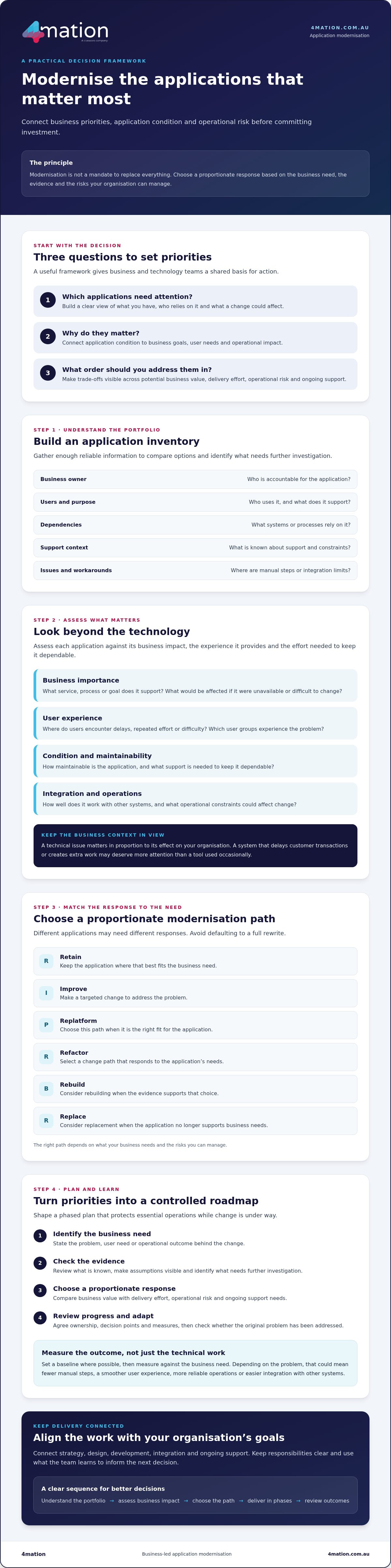
What if the application causing the most frustration isn’t the one your organisation should modernise first? A practical application modernization framework helps you weigh business value, technical condition and operational risk before committing investment. That matters when it’s unclear which systems deserve attention, or how technical work will improve customer experience, efficiency or growth.
Modernisation doesn’t have to mean replacing everything at once. The right path may be to retain, improve, replatform, refactor, rebuild or replace an application, depending on what your business needs and the risks you can manage. A considered approach also helps protect essential operations while change is underway.
This guide sets out a clear method to assess and prioritise your applications, choose a proportionate modernisation path and connect delivery to business outcomes. You’ll learn how to shape a phased plan with clear ownership, risk controls and measures, so your team can make informed decisions and adapt as it learns.
Key Takeaways
- Build an application inventory that captures ownership, users, purpose, dependencies and support context.
- Assess business importance, user experience and maintainability before deciding which applications need investment first.
- Use an application modernization framework to match each application with a proportionate change path, rather than defaulting to a full rewrite.
- Turn priorities into a phased roadmap with clear responsibilities, decision points and measures of business progress.
- Connect strategy, design, development, integration and ongoing support to keep modernisation aligned with your organisation’s goals.
What an application modernisation framework does for your organisation
An application modernization framework is a repeatable way to assess, prioritise, deliver and review changes to business applications. It gives decision-makers a practical method for connecting each technology choice to a business problem, user need or operational outcome.
That distinction matters. Modernisation isn’t an instruction to replace every system or rewrite every application. One application may need a targeted improvement; another may be worth retaining for now. A system that no longer supports business needs may warrant replacement. The framework helps you make those choices using evidence, rather than assumptions or technology trends.
Why application modernisation needs business context
The same technical issue can have very different importance depending on its effect on your organisation. A slow internal tool used occasionally may be less urgent than a system that delays customer transactions or creates extra work for frontline staff. Business goals, user needs and operational constraints help you judge the difference.
For example, staff may be manually transferring information between disconnected systems. The impact could include extra handling, slower service, errors that are harder to spot or customers waiting for updates. A useful modernisation decision addresses the source of that friction, rather than simply moving the existing application to new technology.
To understand the problem, map how the application is used, what it depends on and what else could be affected by change. Architecture-focused approaches, such as Architecture-Driven Modernization, provide context for examining legacy systems and their structure. That technical view is most useful when considered alongside the people, processes and outcomes the application supports.
In practice, modernisation is a sequence of decisions, not a one-off technology refresh. Identify a need, check the evidence, choose a proportionate response and review whether it has addressed the problem.
What the framework should help decision-makers achieve
A useful application modernization framework helps leaders answer three practical questions: which applications need attention, why they matter and what order to address them in. It also makes trade-offs visible, so teams can compare potential business value with delivery effort, operational risk and ongoing support needs.
For each application, define the outcome you want to assess. Depending on the problem, that might be fewer manual steps, a smoother user experience, more reliable operations or easier integration with other systems. Record a baseline where possible, such as the current process steps or the feedback users report. Then agree how and when you’ll review progress. Measures should reflect the original business need, not just whether technical work was completed.
This gives executives and delivery teams a shared basis for decisions. It won’t remove every uncertainty, but it can clarify priorities, assumptions and responsibilities before work begins.
Assess your application portfolio before choosing a modernisation path
Choosing what to modernise starts with understanding what you already have. An application inventory gives business and technology leaders a shared view of each system, who relies on it and what a change could affect. Without that context, prioritisation can favour the loudest request rather than the application with the clearest business case.
For each application, record its business owner, intended users, purpose, key dependencies and support context. Add known issues and constraints, such as manual workarounds, integration limits or periods when disruption would be difficult to manage. The aim isn’t to create a perfect technical catalogue before acting. Gather enough reliable information to compare options and identify what needs further investigation.
Which application assessment criteria matter most?
Use criteria that connect system condition to business impact. Assess how closely the application supports current goals, whether it meets users’ needs, how maintainable it is and how well it works with other systems. Also consider its operational importance and the support needed to keep it dependable.
- Business importance: What service, process or goal does the application support? What would be affected if it were unavailable or difficult to change?
- User experience: Where do users encounter delays, repeated effort or difficulty? Which user groups experience the problem?
- Condition and support: What maintenance issues, workarounds or support dependencies are known?
- Integration and constraints: Which systems rely on it, and what could limit or complicate change?
Separate confirmed evidence from assumptions. For example, mark a documented integration dependency as confirmed, but record an unverified belief that a system is difficult to change as something to investigate. This keeps your application modernization framework grounded in what’s known without giving uncertain information undue weight.
How to prioritise applications fairly
Agree on consistent criteria with business and technology stakeholders, then use them to compare candidate applications. A simple scoring approach can prompt discussion about value, condition, risk and feasibility. It shouldn’t dictate the answer: scores are a discussion aid, and stakeholder judgement remains important when context or evidence changes the picture.
Check dependencies before setting the sequence. An application that appears straightforward to change may support several other systems, while a less visible shared service could be a prerequisite for later work. Map these connections, confirm who owns them and identify which changes need to happen first.
Keep priorities tied to your broader digital transformation strategy, not just technical condition. IBM’s overview of application modernization methods describes approaches such as rehosting, refactoring and rearchitecting. The right option for your organisation depends on what the assessment reveals about business needs, application condition and delivery constraints.
If your team needs help turning portfolio findings into clear priorities, you can discuss your modernisation priorities with 4mation.
Compare application modernisation approaches without defaulting to a rewrite
Modernisation doesn’t automatically mean rewriting an application from the ground up. A full rebuild can make sense in some cases, but it can also introduce transition work, integration challenges and new support needs. The appropriate path depends on the application’s condition, business role and the outcome you need.
Use the options below to guide assessment, not as a fixed ranking. Delivery effort, cost and timing depend on your application, its dependencies and your organisation’s constraints. Assess those factors for your situation rather than assuming a particular approach will be faster or simpler.
| Approach | May suit when | Delivery and support considerations |
|---|---|---|
| Retain | The application still meets business needs and its known limitations are manageable. | Keep ownership and support arrangements clear. Review them as needs or conditions change. |
| Improve | Targeted changes could address specific user or operational problems. | Confirm improvements won’t conflict with existing integrations or increase the maintenance burden. |
| Replatform | The application largely works, but its operating environment creates constraints. | Check compatibility, dependencies and the ongoing skills and support the new environment requires. |
| Refactor | The application’s internal structure makes it difficult to maintain or extend, while its core purpose remains relevant. | Define the scope carefully and test that essential behaviour remains intact as the structure changes. |
| Rebuild | The application can’t meet future needs through proportionate improvements. | Plan how to preserve essential functions, manage data and integrations, and support users through transition. |
| Replace | A different solution may meet the business need more appropriately. | Assess fit, migration, integration, ownership and ongoing support before committing. |
When should you improve, refactor or replatform an application?
Start with the problem you’re trying to solve. If a limited set of changes could reduce user friction, an improvement may be proportionate. If the application’s structure is the barrier to safe maintenance or further development, investigate whether refactoring is appropriate. Replatforming changes the environment an application runs in, while generally aiming to preserve much of its existing functionality.
None of these options is automatically faster, cheaper or safer. Consider technical constraints, dependencies, delivery capacity and what your team will need to support the application afterwards. Microsoft describes modernisation as a continuous cycle of assessment, planning and implementation, rather than a single technology decision.
When might rebuilding or replacing be worth assessing?
Consider these paths when the application can’t meet future business or user needs through proportionate change. Before deciding, identify essential functionality, data flows and integrations, then consider how the transition could affect operations. Include legacy dependencies, continuity and ongoing ownership in your risk assessment.
A practical application modernization framework helps you compare these paths against the same business goals and support requirements, while leaving room for informed judgement.
Turn your application modernisation framework into a controlled roadmap
A clear roadmap turns assessment into work your organisation can own, sequence and review. For each application initiative, follow a consistent cycle: agree the intended outcome, validate the evidence, select a modernisation path, plan delivery and review the results.
Phased delivery gives teams opportunities to check progress, learn from each release and adjust before proceeding with further change. It can also reveal dependencies and operational impacts earlier, instead of treating the portfolio as one large programme with a single end point.
For each initiative, document:
- Outcome and baseline: What business or user need should the work address, and what is happening now?
- Ownership: Which business owner is accountable for the outcome, and who leads technical decisions and delivery?
- Scope and dependencies: Which functions, integrations, data flows and user groups could be affected?
- Decision points: Who approves the selected path, release readiness and any change to scope or sequence?
- Review: When will the team assess results and decide whether to continue, adjust or close the initiative?
Set measures that guide decisions
Choose measures that reflect the intended outcome. If the goal is to reduce manual handling, establish how the current process works and how you’ll assess it after delivery. If the focus is user experience, choose a relevant way to gather and review feedback from the people using the application.
Set a baseline before work begins, name the person responsible for reviewing results and agree when that review will happen. Don’t assign an improvement target without evidence. Use the findings to inform decisions: continue as planned, investigate an unexpected result or revisit the approach.
Plan for continuity as well as delivery
A release affects more than the application itself. Plan for users who need to learn a changed process, connected systems that exchange information and operational teams responsible for day-to-day support. Define the testing required, who accepts the release and how teams will respond if an issue emerges. Confirm support responsibilities before the change goes live, not after delivery is complete.
Ongoing ownership matters too. Your roadmap should account for ongoing software maintenance and support, so the modernised application remains supported as business needs evolve. Delivery, operational readiness and review all contribute to the outcome.
If you’re shaping a roadmap and want to discuss how to manage delivery around your organisation’s goals, talk with 4mation about your application roadmap.
Sustain application modernisation with the right delivery partner
A sound framework helps you decide what to change and why. A delivery partner should help turn those decisions into coordinated work, keeping business goals, users and operational needs in view from planning through ongoing support.
What to look for in an application modernisation partner
Start with how a potential partner approaches the problem. They should take time to understand your organisation, users and operating constraints before recommending a technology path. Ask how they’ll help validate priorities, manage dependencies and define what success should look like.
Modernisation often involves connected capabilities. Strategy helps set direction; design brings user needs into the solution; development delivers the required application changes; integration helps systems work together; and support helps maintain the result over time. Check how these activities will be coordinated and who will work with your team at each stage. If new or substantially changed applications are part of the plan, explore the partner’s custom software development services.
Also discuss how decisions will be made as delivery progresses. Clear responsibilities for business ownership, technical choices, user feedback and release approval help keep the work aligned with agreed outcomes.
How 4mation can help you move from framework to action
4mation works with Australian organisations to connect application decisions to business goals, user needs and operational challenges. Its capabilities span strategy, design, custom software development, system integration, practical AI and ongoing support. The team can help assess where change may be useful and determine an appropriate next step, without assuming every application needs the same treatment.
4mation states it has 25 years of client success. Its published case studies include ABC, SG Fleet, Altus Traffic and Billbergia. Review each case study to understand its context and the specific work described, rather than assuming the same outcomes will apply to your organisation.
A practical application modernization framework is most valuable when it guides clear, owned decisions and remains responsive to what your team learns during delivery. If you’re ready to discuss your priorities and identify a useful next step, discuss your application modernisation priorities with 4mation.
Make your next modernisation decision with confidence
A practical application modernization framework helps you prioritise applications by business value, condition and risk, rather than defaulting to a full rewrite. It also connects assessment to delivery through clear ownership, risk controls and measures tied to the outcomes your organisation needs.
Use the framework to make decisions that fit your users and operating environment. Review the evidence, choose a proportionate approach and let each delivery phase inform what comes next. A capable partner can help connect strategy, design, development, integration and ongoing support.
4mation works with Australian organisations on custom software, application modernisation and technology support. Its published case studies include projects with organisations such as ABC, SG Fleet, Altus Traffic and Billbergia, offering examples of work across different business contexts.
Ready to decide what deserves attention first? Discuss your application modernisation priorities with 4mation and explore a practical next step for your organisation. Progress can begin with one well-informed decision.
Frequently Asked Questions
What is an application modernisation framework?
An application modernisation framework is a repeatable way to assess applications, prioritise change and choose an appropriate delivery path. It connects business goals and user needs with each application’s condition, dependencies and operational requirements. A useful framework also clarifies ownership, measures and ongoing support. It guides decisions rather than prescribing one technology or requiring every application to be replaced. The phrase “application modernization framework” refers to the same structured approach.
How do you build an application modernisation framework?
Start by agreeing the business outcomes you want and identifying the applications in scope. Gather evidence about each application’s users, business importance, dependencies, known issues and support needs. Apply consistent criteria to prioritise the portfolio, then compare suitable change paths. Build a phased roadmap with accountable owners, measures, delivery controls and review points. Before committing to work, validate assumptions with the business and technology stakeholders who understand the applications and their operational context.
Does application modernisation always mean rewriting an application?
No. Rewriting is one possible path, not the default. Depending on the application and your organisation’s needs, you might retain it, make targeted improvements, change its operating environment or structure, rebuild it, or replace it. Assess business value, application condition, dependencies and delivery implications before choosing. For example, if an application still meets core needs but has a specific usability issue, a targeted improvement may be worth investigating before considering a full rebuild.
How do you prioritise applications for modernisation?
Compare applications using criteria agreed by business and technology stakeholders. Consider business importance, user needs, operational constraints, known issues, dependencies and feasibility. Record the evidence behind each assessment and flag assumptions that need validation. This helps decision-makers understand why an application matters and what could affect the order of work. Treat scores as a prompt for discussion, not an automatic decision, and revisit priorities when business goals, application conditions or delivery constraints change.
What should an application modernisation roadmap include?
A roadmap should connect each initiative to its intended business outcome and selected change path. Include accountable business and technology owners, dependencies, delivery stages, user impacts, testing, release planning and ongoing support responsibilities. Define how progress will be measured, who will review it and when decisions are due. Keep the plan adaptable enough to reflect new evidence, while maintaining clear priorities and decision points across business and technology teams.
How can you reduce risk during application modernisation?
Start with reliable information about the application, its users, dependencies and operational importance. Make assumptions visible, agree who owns key decisions and plan testing and release responsibilities before delivery begins. Consider the effect on users, connected systems and essential workflows. Set review points and measures that help the team spot issues and make informed decisions. The right controls depend on the application and your organisation, so confirm them with the people responsible for delivery and operations.
When should you engage an application modernisation partner?
Consider engaging a partner when your team needs support assessing applications, clarifying business outcomes, evaluating technical options or delivering planned changes. Look for a team that understands your goals, users and operating needs before recommending an approach. Ask how it can connect planning, design, development, integration and ongoing support, and clarify responsibilities from the outset. Choose support that fits your priorities and internal capability, with measures that keep the work focused on useful business outcomes.
About The Author
