How to Plan User Acceptance Testing Scope, Goals and Schedule
Jowena BorralDigital Marketing Specialist

A smooth software release depends on more than working code. The best user acceptance testing best practices help real users complete the business tasks the software is designed to support before it goes live.
UAT can look like a final check or a box to tick. It works best when its purpose, scope and timing are clear, and the right people have time to test realistic scenarios. A structured approach helps teams find gaps while there’s still time to address them.
This guide covers how to define UAT scope and goals, choose participants, prepare a test environment and set a workable schedule. It also explains how to select test types, document and prioritise findings, and use feedback throughout software development. With a practical plan, your team can focus on the workflows that matter and make a better-informed decision about release readiness.
Key Takeaways
- Set clear testing boundaries and objectives so UAT focuses on the business outcomes that matter.
- Build a realistic schedule around users’ availability, with time to resolve and retest priority defects.
- Prepare a separate, production-like test environment with clean, accessible sample data.
- Turn business requirements into understandable scenarios and measurable acceptance criteria.
- Choose test types that fit your risks, combining user judgement with automation where it adds value.
Planning for limited time and suitable test environments
Set the UAT window, environment and reporting process before testing starts. Test management tools can track cases, defects, progress and sign-off, while a shared issue tracker captures feedback. Common risks include unavailable testers, unstable environments and poorly documented defects. Schedule early, prepare a production-like environment and agree on clear reporting to reduce these risks.
Allocate UAT time and choose environments
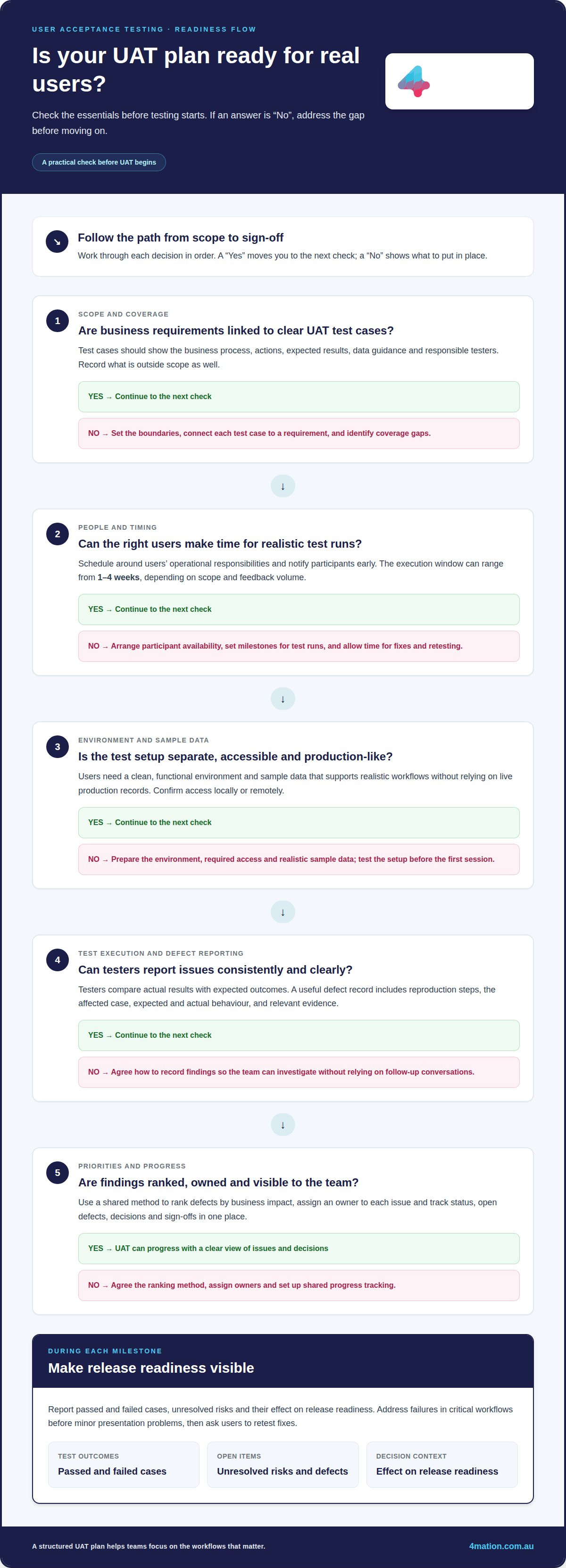
Schedule testing around users’ operational responsibilities and notify participants early, so they can reserve time for realistic test runs. The execution window can range from 1-4 weeks, depending on scope and feedback volume. Build milestones around test runs, then allow room for delays, defect fixes and retesting. Use a separate environment that closely mimics production, rather than risking live operations.
Prepare the test environment and sample data
Prepare a clean, functional environment with the access and sample data each scenario requires. Confirm that participants can access it locally or remotely, and that the data supports realistic workflows without relying on live production records. For example, a customer-service test may need sample accounts with different order statuses. Test the setup before the first scheduled session.
- Connect test cases to requirements. Create a traceable test plan covering business processes, action sequences, expected results, data guidelines and responsible testers. Link each test case to a business requirement so the team can see what has been covered and where gaps remain. Record what’s outside scope too, so late requests don’t displace priority scenarios.
- Run tests and report defects consistently. Ask testers to follow each case, compare actual results with expected outcomes and document any issues. A useful defect record includes reproduction steps, the affected test case, expected and actual behaviour, and relevant evidence. Consistent details help the team investigate without relying on follow-up conversations.
- Prioritise findings and report progress. Agree on a shared method for ranking defects by business impact, then assign an owner to each issue. Address failures in critical workflows before minor presentation problems, and ask users to retest fixes. Track test status, open defects, decisions and sign-offs in one place. At each milestone, report passed and failed cases, unresolved risks and their effect on release readiness.
How Should User Acceptance Testing Be Performed?
Build each UAT test from a business requirement, then define what a user must achieve. The steps below turn broad expectations into outcomes testers can assess consistently.
Confirm business requirements
Start with the business requirements behind each feature, workflow or user role. For an online order, this could mean capturing customer details, calculating delivery and confirming payment. Identify the requirement’s business owner and intended user, then distinguish essential outcomes from optional preferences. This keeps UAT focused on business needs instead of testing features without a clear purpose.
Write acceptance criteria for user stories
Pair each user story with acceptance criteria before writing test scripts. A useful story states who needs something, what they need and why. For example: “As a customer, I want to track my order so I know when it will arrive.” Define the expected behaviour too, including what happens when an order number is invalid. Avoid criteria that depend on interpretation.
Define testable, measurable outcomes
Write each criterion so a tester can observe whether it passes or fails. “The order page is easy to use” is subjective. “The customer can view the current order status after entering a valid order number” describes an observable result. State the starting conditions, user action and expected response. Include an unsuccessful path, such as an error message for an unknown order.
- Trace each test to its requirement. Link the requirement, user story, acceptance criteria and UAT test case in one record. For a password reset, the chain might cover the user’s request, the reset link and the resulting access. This traceability shows whether important business needs have been tested and helps explain why a case passed or failed.
- Write scenarios in the user’s language. Give testers clear steps that don’t require technical knowledge. A finance user might select an invoice, amend its due date and save the change. Specify the required information and expected result at each stage. Cover normal use and a relevant exception, such as trying to save without a required field.
- Review criteria with users before testing. Ask representative users and business stakeholders to check that each outcome reflects real work. Resolve conflicting interpretations before test execution, then update linked cases when requirements change. If the wording or outcome needs alignment across your team, discuss your UAT approach with a technology partner.
UAT purpose and role in the software development lifecycle
UAT lets intended users assess whether software supports real business work before release. In waterfall projects, it usually follows development and system testing. Teams can gather user feedback throughout development and after release.
Establish UAT purpose and benefits
Define UAT as a way to validate business workflows and user needs, not to find every technical defect. Quality assurance covers checks such as unit, integration and system testing. UAT asks whether the application works for its intended users. For example, a payroll user can confirm that an approved leave request appears correctly in a pay run. This helps assess release readiness and identify training or support needs.
Place UAT in the development lifecycle
Schedule UAT after the development team completes technical testing and before the software moves into production. Business users can then validate end-to-end processes against realistic scenarios. Involve users earlier in development as well, so teams can address misunderstandings before final validation. For a staff rostering application, early input can clarify how managers approve shift changes.
Adapt UAT to delivery approaches
Match UAT timing to the project’s delivery approach. In waterfall, plan a distinct acceptance phase once the system is ready for end-to-end business validation. In Agile, involve users in reviewing completed increments, then test integrated workflows before release. With continuous delivery, use ongoing user feedback and release-focused validation instead of relying on one final testing window.
- Bring the right people into validation. Include actual or potential users, business stakeholders and relevant project roles. The development team understands how the software was built, but daily users know where a workflow interrupts real work. For an expense application, involve employees who submit claims and finance staff who review them. Their perspectives can reveal gaps a technical check may miss.
- Use findings to guide the next decision. Record user feedback, unresolved issues and acceptance decisions so the business can assess release readiness. If testers find that a sales application requires duplicate customer entry, the team can decide whether to fix the workflow before release or adjust rollout priorities. Keep gathering feedback after launch as requirements, integrations and operating conditions change.
Planning UAT scope, objectives and schedule
Translate business priorities into a defined scope, clear objectives and a workable schedule. The steps below connect each test to a business outcome, such as reducing invoice-processing errors.
Align UAT with business objectives
Map each UAT objective to a business priority before choosing test cases. For an invoice system, reducing manual corrections might be a priority. Testers can then validate invoice entry, approval and reporting. Include workflows that affect this outcome and exclude features unrelated to the release goals. This gives every scenario a clear purpose.
Confirm business objectives
Ask the business owner and process users to confirm the outcomes UAT must demonstrate. For example, a warehouse manager may need accurate stock availability before approving an order. Record the expected result and who accepts it. Resolve different stakeholder expectations before scheduling tests, so the team isn’t assessing success against conflicting objectives.
- Set the boundaries of the test scope. List the processes, user roles, integrations and release features included in UAT. For a booking application, the scope might cover creating, changing and cancelling a booking while excluding an unrelated reporting module. State what won’t be tested too. This helps testers focus their time and makes requests to expand scope easier to assess.
- Build a schedule around the work. A typical UAT phase takes 2-4 weeks, depending on scope. Break that period into test runs, feedback review, fixes and retesting. For example, schedule booking changes before cancellations if both rely on the same customer record. Confirm tester availability and dependencies with the testing team, then leave room for unexpected delays rather than filling every day with cases.
- Set completion and decision criteria. Define what must be passed, resolved or accepted before UAT ends. A finance release might require successful testing of payment approval and reconciliation, with critical defects resolved or explicitly assessed. Name the decision-maker, record outstanding issues and agree how results will affect the release. This connects test completion to business readiness instead of a vague sense that testing is finished.
Types of user acceptance testing
Choose acceptance testing types according to your users, risks and release context. For an online booking system, user acceptance testing best practices can include internal checks before a wider customer trial.
- Use alpha testing to uncover early usability gaps. Conduct alpha testing in-house with the development team and a small group of end users. For example, staff can create and amend a booking while developers observe where instructions or screen labels cause confusion. Use this early feedback to refine the application before involving a broader audience.
- Use beta testing to assess real-world use. Invite a broader audience from outside the organisation, usually real users in a live environment. A booking service, for example, can gather feedback from customers using different devices and following their usual routines. Beta testing may reveal user scenarios that scripted internal sessions don’t capture.
- Use contractual acceptance testing to assess agreed requirements. Compare the delivered software with the acceptance criteria agreed between the client and vendor. For a scheduling system, testers might check whether specified booking and reporting workflows meet the agreed service-level criteria. Record the result against each requirement to support a clear acceptance decision.
- Use regulatory acceptance testing for relevant obligations. Check whether the software meets applicable laws, regulations and standards. For example, a team handling sensitive customer records can test access controls and data-handling scenarios against defined requirements. Include edge cases and record evidence so reviewers can see how the system behaves under each tested condition.
- Keep manual testing centred on people. Ask end users to perform realistic tasks, explore visual elements and explain where a workflow is unclear. For example, a staff member can complete a booking while describing what they expect each screen to do. Human judgement is essential for assessing usability and user experience, even when other test cases are automated.
- Apply automation where repeatability matters. Automated checks can run multiple test cases simultaneously, helping teams validate repeated workflows, such as submitting a booking with different dates. Good user acceptance testing best practices combine repeatable checks with users’ assessment of actual business needs. Automation supports testing but doesn’t replace human judgement about the user experience.
For a software release with several user groups or acceptance obligations, discuss your UAT planning with a technology partner.
4Mation
4mation can help when UAT exposes a gap between what software delivers and what your business needs. The next step is to understand the workflows, users and outcomes that matter, then shape the right development approach around them. Clear planning helps your team make informed decisions about scope, acceptance criteria and release readiness.
UAT is most useful when it reflects how your organisation will use a solution. For a new web application, that might mean validating how staff handle customer requests from submission through resolution. For a mobile app, it could mean checking whether users can complete a key task in the conditions they encounter at work. These scenarios turn business requirements into practical checks.
4mation’s Custom Software Development, Mobile App Development and Web Application Development can address different product needs. Its AI Consulting & Implementation can help when your project includes AI. The right direction depends on your goals, users, existing processes and the business problem the software must solve. We work with you to understand those factors, rather than adding complexity that doesn’t support a clear outcome.
Consider involving a development partner when requirements are hard to turn into testable scenarios, internal teams lack capacity to coordinate user feedback, or repeated UAT findings point to a deeper workflow issue. Early collaboration brings business and technical perspectives together before assumptions become embedded in a solution. It can also connect testing decisions to the priorities shaping development.
As work progresses, user feedback can inform refinements to workflows, interfaces and acceptance expectations. If staff can complete a task only by using workarounds, for example, the team can assess whether the workflow meets the intended business need. Recording that distinction helps decision-makers weigh usability, operational impact and release priorities together.
Whether you’re planning a new application or improving an existing process through tailored software, 4mation can work with your team to connect development decisions to real business needs. Get in touch with 4mation to discuss your project and next steps.
Turn UAT feedback into your next improvement
UAT can inform decisions beyond a release. Treat user feedback as input to future product priorities, not just a record of what passed. A recurring workaround, for example, may show that a workflow needs attention in a later update. This connects user experience with ongoing technology investment.
The most useful user acceptance testing best practices create a continuous feedback loop. As business needs, integrations and working conditions change, revisit whether the software still helps people complete essential tasks. This gives your team a clear basis for deciding what to refine next and keeps improvements connected to operational needs.
If you’re planning UAT for a new solution or refining how users validate an existing one, 4mation can help you consider the right development approach for your goals. Contact 4mation to discuss UAT and take a considered next step towards software that works for your business.
Frequently Asked Questions
What Is Acceptance Testing in Simple Words?
Acceptance testing checks whether a completed system meets the needs it was built to serve. For example, a community organisation might test whether its donation platform lets a supporter contribute and receive a clear confirmation. The focus is the user’s outcome, not the code behind the screen. Findings help the organisation decide whether the solution suits its intended use.
What Is the UAT Checklist?
A UAT checklist records what needs to happen before, during and after user testing. It can cover participant access, agreed scenarios, business contacts, issue reporting, evidence capture and how decisions will be recorded. For example, a test lead might confirm each participant has the right account before a session. Afterwards, the checklist can prompt the team to review outstanding feedback and record its decision.
What’s the Difference Between QA and UAT?
Quality assurance (QA) checks whether software behaves correctly; UAT checks whether it works for the people and business processes it serves. A QA tester might confirm that a search returns matching records. A service adviser performing UAT might assess whether those results help resolve a customer enquiry. Both perspectives matter: one examines product quality, the other whether the software is useful in real work.
Do you really need UAT?
UAT matters when a release changes a workflow that staff or customers rely on. Technical testing may confirm that a form saves data, while a frontline employee may notice that the saved information doesn’t support their next task. User validation is especially relevant for new workflows, major changes or connected systems. For a low-impact change, scale testing to the business consequences of an error.
How Can AI Support the UAT Testing Process?
AI can help draft test scenarios from requirements and highlight workflows that may need closer attention. For example, a team could use AI to suggest variations on a customer onboarding journey, then ask business users which reflect actual practice. AI can also help identify areas prone to human error. Treat suggestions as a starting point, and let people assess usability, context and business suitability.
How to Choose UAT Participants and Stakeholders?
Choose participants who understand the work being tested and represent the people who will use the system. For a rostering platform, that could include a shift manager who builds schedules and an employee who checks assigned shifts. Include business decision-makers who can clarify priorities and accept outcomes. Developers can answer questions, but intended users should judge whether the workflow meets their needs.
How to Improve UAT Testing?
Make feedback actionable by giving testers a simple way to describe what they tried, what they expected and what happened. For example, a screenshot of an incorrect invoice total can clarify the issue alongside the steps that produced it. Review feedback with the relevant business owner, then use recurring themes to refine future scenarios. A short debrief after each session can also expose unclear instructions.
What Is UAT Testing with an Example?
Imagine a team preparing a new staff expense system. An employee submits a travel claim, attaches a receipt and sends it for approval. A manager reviews the claim and checks that the approval view shows the right information. Participants assess whether these steps match their actual process and flag any confusion. Their feedback helps the organisation judge whether the system supports the work in practice.
About The Author
