High performance web development for responsive user experiences
Jowena BorralDigital Marketing Specialist

A fast website isn’t automatically a high-performing web application. High performance web development brings together responsive interfaces, efficient backend design and reliable delivery, helping people complete tasks smoothly as your business grows.
Speed matters, but it’s only part of the experience. Users expect pages to respond promptly when they tap, type or submit a form, and they need the application to work consistently across devices. Meeting those expectations depends on decisions across the technology stack, not just visual design.
This article explains how backend architecture and APIs support performance, how caching, compression and content delivery can improve responsiveness, and how to choose technologies for your application’s needs. It also covers Interaction to Next Paint (INP), a Core Web Vital that measures how quickly an interface responds to user interactions, and practical ways development teams can optimise it. You’ll gain a clearer view of the choices that help create a responsive, scalable application and a better user experience.
Key Takeaways
- Align backend architecture and APIs with your application’s data needs and expected growth to support responsive, reliable experiences.
- Use compression, caching and content delivery networks to reduce avoidable delays and server load.
- Choose a technology stack based on your application’s requirements, integrations and long-term maintenance needs, not trends alone.
- Monitor Interaction to Next Paint (INP) and optimise the tasks that make pages feel slow or unresponsive to users.
- Match performance and security decisions to the needs of your e-commerce, content management or custom web application.
Backend logic, APIs and scalability
Backend design determines how an application processes requests, manages data and delivers its functionality. Its architecture affects response times and integrations, as well as how readily the application can grow.
Backend Logic and Scalability
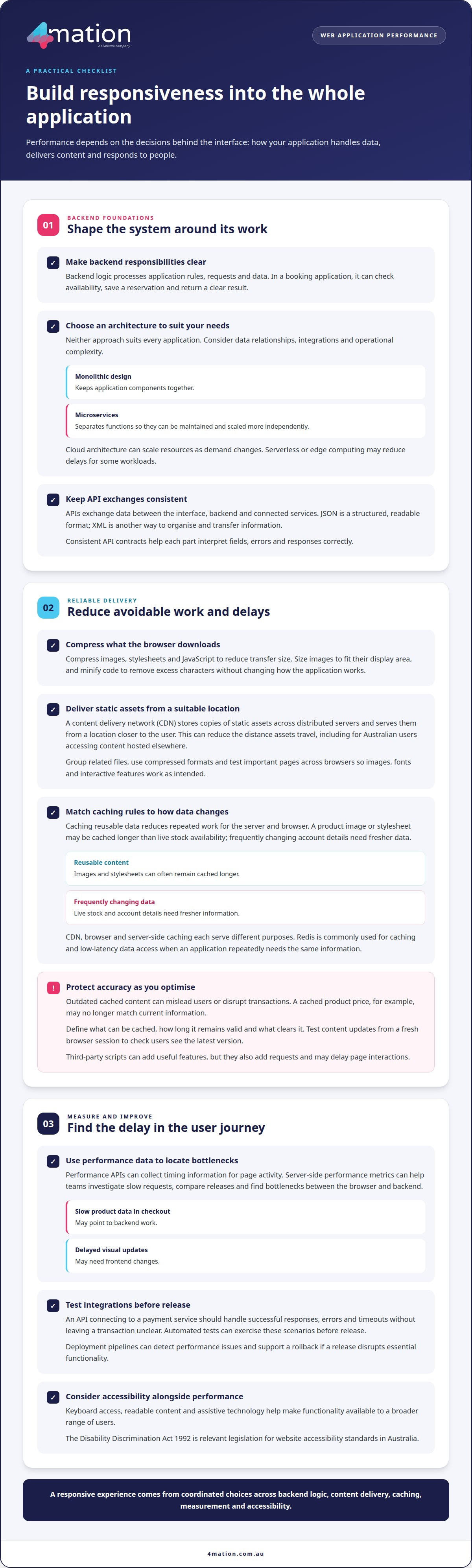
Backend logic is the server-side processing that handles application rules, requests and data. A slow or tightly coupled backend can limit the user experience as demand and functionality grow. For example, an online booking application must validate availability, save a reservation and return a clear result. Clearly defined responsibilities help teams maintain these processes as requirements change.
Architecture shapes how an application can scale. A monolithic design keeps components together, while microservices separate functions into services that can be maintained and scaled more independently. Neither approach suits every application. Choose based on data relationships, integration needs and operational complexity. Cloud architecture can scale resources as demand changes, while serverless or edge computing may reduce delays for some workloads.
APIs define how an application exchanges data between its interface, backend and connected services. A booking interface, for instance, might send a request to an API, which checks availability and returns the result. JSON provides a structured, readable format for this exchange; XML is another way to organise and transfer information. Consistent API contracts help each part interpret fields, errors and responses correctly.
Integrations need clear boundaries and dependable release practices. An API connecting an application to a payment service should handle successful responses, errors and timeouts without leaving a transaction in an unclear state. Automated tests can exercise these scenarios before release. Deployment pipelines can also detect performance issues and support a rollback if a release disrupts essential functionality. These practices help teams control updates as integrations evolve.
Web Platform and Performance APIs
Browser capabilities and interfaces support web application behaviour. Browser APIs for tasks such as form validation or local storage can provide useful functionality without unnecessary code. Performance APIs provide measurements that help teams identify delays. Using data from real application activity helps focus optimisation on the user journeys that need it.
For example, the Performance API can collect timing information for page activity, while teams can gather and act on server-side performance metrics alongside other data. These measurements help investigate slow requests, compare releases and find bottlenecks between the browser and backend. Slow product data responses in a checkout flow may point to backend work, while delayed visual updates may require frontend changes.
Accessibility also belongs in the design and delivery of Australian websites. The Disability Discrimination Act 1992 is the legislation relevant to website accessibility standards in Australia, according to the Australian Government Federal Register of Legislation. Considering keyboard access, readable content and assistive technology alongside performance helps teams build functionality for a broader range of users.
Compression, caching and content delivery
Improve loading speed and responsiveness by compressing assets, caching reusable content and delivering files through a content delivery network (CDN). These techniques reduce transfer size and server work, but stale cached data or a slow third-party script can affect accuracy and the user experience.
Asset Compression and Content Delivery
Asset compression reduces the size of images, stylesheets and JavaScript files, helping browsers download page resources more efficiently. For example, sizing an image to fit its display area avoids sending unnecessary detail to a mobile device. Minifying code can also remove excess characters without changing how the application works, reducing the data browsers need to retrieve.
A CDN stores copies of static assets across distributed servers and delivers them from a location closer to each user. This can reduce the distance assets travel, particularly for Australian users accessing content hosted elsewhere. Teams can group related files, use compressed formats and test important pages across browsers to ensure images, fonts and interactive features work as intended.
Caching Strategies
Caching keeps reusable data available for later requests, reducing repeated work for the server and the user’s browser. A product image or stylesheet can often be cached longer than live stock availability. Redis, an in-memory data store, is commonly used for caching and low-latency data access when an application repeatedly needs the same information.
Set caching rules according to how often content changes. Versioned filenames can prompt browsers to fetch a new stylesheet after an update, while frequently changing account details need fresher data. CDN, browser and server-side caching each serve different purposes. Testing a content update from a fresh browser session helps reveal whether users see the latest version.
Optimisation Trade-offs and Risks
Caching improves efficiency, but outdated content can mislead users or disrupt transactions. A cached product price, for example, may no longer match current information. Define which data can be stored, how long it remains valid and what event clears it. Testing changes to these rules helps balance faster responses with accurate content.
Third-party scripts can add useful features, such as analytics or embedded support, but they also add requests and may delay page interactions. Review each script’s purpose, load it only where needed, and test the page with and without it. If repeated requests or heavy assets are affecting an important journey, discuss performance priorities with the team.
Full-stack development approaches and technology stacks
Full-stack development brings together the interface users see and the server-side software behind it. The right combination helps your platform deliver useful functionality and remain practical to update as business needs change.
Full-Stack Development Approaches
Full-stack development combines frontend and backend work to create a complete application. Decisions about the interface, application logic and database affect each other. For example, a reporting platform needs a clear dashboard and backend processes that retrieve accurate information efficiently.
Teams can organise work around features, such as user accounts or reporting, or divide it by frontend and backend responsibilities. A feature-based approach can keep related interface and server changes together. Whichever model you use, shared requirements and testing help prevent mismatches between what the interface requests and what the backend returns.
Full-Stack Technologies and Frameworks
A technology stack is the set of languages, frameworks and data tools used to build an application. MERN combines MongoDB, Express.js, React and Node.js, using JavaScript across its main layers. It can suit teams seeking a consistent language across interface and server code, with MongoDB providing the database layer.
Other options address different needs. MEAN also uses JavaScript, with Angular in place of React, while LAMP combines Linux, Apache, MySQL and PHP. Django is a Python-based framework; Java supports enterprise applications, and Ruby on Rails supports database-driven software. Each choice shapes how teams build features and maintain updates.
Technology Stack Selection
Select a stack by defining the application’s users, core tasks, data needs and integrations before comparing technologies. For an e-commerce platform, product catalogues, inventory updates and checkout requirements will influence database and framework choices. A data-heavy internal tool may instead prioritise reporting and integration with existing business systems.
Technology stack decisions shape high performance web development by influencing data processing, integrations and future updates. Also assess security, maintainability and how well the stack suits your organisation’s existing skills. An established language may help teams share knowledge, while an unfamiliar framework can introduce training and support needs.
Test the preferred stack against a representative feature, such as a dashboard connected to a database. These checks can reveal integration issues and help teams assess whether the architecture can support high performance web development as requirements evolve. For tailored software development, choose technologies around business requirements rather than popularity alone.
Interaction to Next Paint (INP) optimisation
Responsive web apps need to react promptly when users tap, type or select an option. Interaction to Next Paint (INP) is a Core Web Vital that measures responsiveness across user interactions.
Understand and optimise INP
INP reflects the time between an interaction and the next visual update. Web performance guidelines indicate that pages should respond to user input within 50 to 200 milliseconds. A delayed product filter, menu or form submission can make an otherwise polished interface feel unresponsive.
Optimisation starts by finding which interaction takes longest. For example, a search field may trigger a large JavaScript task every time someone types. Developers can reduce unnecessary work, split complex tasks into smaller pieces or update the interface before completing non-essential processing. The right adjustment depends on what the interaction needs to do.
Consider the complete response, not just the event handler. Browser processing, application logic and rendering all affect when the next screen update appears. If selecting a date freezes a booking calendar, trace the interaction through each stage and address the slowest work. This focuses effort on delays users can see, rather than code changes without a clear benefit.
Monitor performance and refine changes
Performance monitoring helps teams find problems in real user journeys and assess whether an update improves responsiveness. The Performance API can capture browser timing information, while server-side metrics help distinguish a slow request from a slow interface response. A checkout button, for instance, may respond late because of client-side processing or the service it calls.
Test representative journeys before and after each change. Compare interactions such as opening a navigation menu, adding a product to a cart and submitting a form. If one fix improves search but delays checkout, the results expose that trade-off. Monitoring after release also helps identify regressions caused by new features or software updates.
Build responsive experiences across devices
Responsive design adapts layout and interaction to different screen sizes and input methods. A navigation menu that works with a mouse should also support touch and keyboard use. CSS layouts can reorganise content for a narrow mobile screen, keeping key actions visible without forcing users to zoom or scroll sideways.
Test web apps in different browsers and viewport sizes, including a mobile product page and a desktop dashboard. Check that buttons are easy to activate, forms provide clear feedback and content reflows as the screen changes. This practical optimisation links responsiveness with everyday usability, helping users complete tasks across devices.
What Makes a High-Performance Web Application?
A high-performing application helps users complete meaningful tasks smoothly, from finding a product to submitting a form. It combines responsive behaviour, reliable functionality, accessibility and security, rather than focusing on speed alone.
The development process moves from requirements and user experience design through frontend and backend development, testing, deployment and maintenance. For example, teams can test a booking journey before launch, then monitor it after release to identify issues and guide improvements.
Performance that supports real business tasks
Loading speed affects how easily visitors can reach the content or action they need. Assess performance against the journeys that matter to your business, such as product discovery or account access, and look for delays that make these tasks harder to complete.
Performance also means consistency. An e-commerce application should let customers browse products, update a cart and complete checkout without confusing delays. A content management system (CMS) should help staff publish and manage content efficiently. A custom web application may need to support a specific workflow, such as reviewing requests across teams.
Design around application requirements
Each type of web application has different priorities. An e-commerce platform needs dependable product and checkout flows; a CMS needs practical publishing tools; and a custom application must reflect the organisation’s processes. Defining requirements early helps teams choose the right functionality and avoid building features that don’t serve users.
Custom application development is useful when standard workflows cannot support the way your organisation operates. For example, a team may need one interface to bring together approvals, records and reporting. The design should make these tasks clear, while the underlying application supports accurate data and future updates.
Security and accessibility are part of performance
A responsive experience must also protect information and support access for different users. Web application security practices include secure authentication and authorisation, encryption, secure APIs, and protection against SQL injection, cross-site scripting (XSS) and cross-site request forgery (CSRF). Build these controls into design, coding and testing, rather than treating them as a final check.
Accessibility matters too. Clear labels, keyboard-friendly controls and readable content can make an application easier to use. For an e-commerce checkout, for instance, users should be able to understand each field and correct errors. To discuss a web application shaped around your business requirements, contact the 4mation team.
4Mation
4mation can help you translate performance priorities into a practical plan for your application. This is useful when you’re planning a new digital service, refining an existing platform or assessing why important user journeys feel slow. We work with you to understand the business context first, so decisions about technology and delivery reflect your users, operational needs and goals.
Start with a shared understanding of what the application needs to achieve. Explore who uses it, which tasks matter most, how it fits with existing systems and what may need to change over time. A customer-facing service and an internal workflow tool, for example, have different users and demands. These distinctions help define a sensible scope before development begins.
From there, 4mation can support the work through Web Application Development or Custom Software Development, depending on the problem you need to solve. The aim is to shape the solution around your requirements rather than add complexity without a clear purpose. If users also need a mobile experience, Mobile App Development may form part of the broader approach.
Technology decisions should deliver practical outcomes. A well-planned application can support a smoother customer journey, make essential tasks clearer for staff or help your organisation adapt its digital services. Where artificial intelligence fits a defined business need, AI Consulting & Implementation can help assess its role within the wider application strategy, without treating it as a default solution.
Delivery also calls for clear priorities and regular communication. We work with you to align scope, user needs and technical decisions as the project develops. This keeps the conversation focused on what the application must do, how it will fit into your operations and what success should look like for your organisation.
If you’re considering a new application or want to improve an existing experience, a conversation can help clarify the next step. Share the user needs and business outcomes you’re working towards, and 4mation can discuss an approach suited to your requirements. Contact 4mation to discuss your project.
Turn performance goals into your next steps
Use your application’s performance priorities to shape its next stage of development. Decide which user journeys matter most, what currently slows them down and how improvements will support business goals. A clear plan helps you sequence work, assess trade-offs and tie technical decisions to the experience you want to deliver.
4mation can work with you to turn those priorities into a practical direction. Its capabilities include Custom Software Development, AI Consulting & Implementation and Mobile App Development. The right combination depends on your organisation’s needs, from developing a new digital service to improving how existing systems support your users. A focused discussion can clarify the outcomes you’re seeking and the work needed to pursue them.
Whether you’re planning an application or refining one already in use, the next step is to connect performance decisions with your business priorities. Discuss your project with 4mation and explore a considered approach to high performance web development.
With a clear direction, you can make progress that serves your users and your organisation.
Frequently Asked Questions
Recommended Web Performance Timings: How long is too long?
A page is taking too long when its main content is slow to appear or the interface feels delayed during use. Google’s Core Web Vitals class an LCP of 2.5 seconds or less as good; above that, review what is delaying the largest visible element. Also check how quickly key actions work and whether content shifts as the page loads. The right improvement depends on the page and the user task.
What does high-performance web development mean?
High-performance web development means building a site or application that responds promptly, remains stable under expected demand and supports users across devices. It considers the whole experience, not just page-load speed: search, forms, checkout and other important tasks should work smoothly. For a business, that can mean fewer barriers between a customer and a completed action. 4mation’s Website Development and Web Application Development work can address these needs through a solution shaped around your users and goals.
What web performance metrics and Core Web Vitals should developers target?
Developers should target Google’s “good” Core Web Vitals at the 75th percentile: LCP at or below 2.5 seconds, INP at or below 200 milliseconds, and CLS at or below 0.1. LCP measures when the main content appears, INP measures interaction responsiveness, and CLS measures unexpected layout movement. These thresholds help identify issues affecting real users; developers should also track task-specific measures, such as how long a product search or form submission takes.
Which web development frameworks and hosting platforms deliver the best performance?
No framework or hosting platform is fastest for every project. Performance depends on how the application is designed, the work each page performs, the quality of implementation and the infrastructure’s fit for expected demand. A content-led website may need a different setup from a complex web application with frequent data updates. 4mation works with technologies including .NET, React and Node.js, and can assess the options against your requirements rather than choosing a stack by trend.
How do image formats, compression, caching and CDNs affect website performance?
Images can add substantial data to a page, so choosing an efficient format, compressing files and serving suitable dimensions can reduce what users need to download. Browser and server caching can avoid repeatedly fetching unchanged resources. A content delivery network, or CDN, distributes cached content through a network of locations and can reduce delivery delays. The right combination depends on the site’s content, update patterns, audience and infrastructure.
How can developers measure and test website performance across devices and networks?
Use both controlled tests and real-user data. Tools such as Lighthouse and Chrome DevTools help developers diagnose issues in a repeatable test, while Google’s PageSpeed Insights reports lab results and field data where available. Test key journeys on mobile and desktop, and simulate slower connections to uncover delays that a fast office network can hide. 4mation can build performance checks into development and ongoing support, so issues are assessed as the product changes.
About The Author
