Custom Workflow Automation Development: From Manual Work to Measurable Progress
Jowena BorralDigital Marketing Specialist

Automating a poorly understood process can make its problems happen faster. When staff repeat data entry across disconnected systems or rely on manual handovers, delays and avoidable errors can affect service and limit capacity. Custom workflow automation development can address those issues, but it needs to fit the way your business works.
Off-the-shelf tools may not accommodate the processes that matter most to your organisation. A useful automation project starts with the work itself: where time is lost, where information gets stuck and what a better outcome would look like. The goal isn’t automation for its own sake. It’s a measurable improvement your team can rely on.
This article explains how to identify a workflow with real business value and shape an approach around your users, goals and existing systems. It also covers how discovery, design, development, integration and ongoing support fit together, and how different engagement models can help manage delivery risk. With a clear process and the right technical foundations, automation can move your team from repetitive tasks towards more valuable work.
Key Takeaways
- Start with a recurring process that creates delays, duplicated effort or errors, then define the business outcome you want to improve.
- Map the workflow before choosing technology so your team can account for handovers, exceptions and the systems involved.
- Compare configured platforms, custom software and AI-enabled components by how well they fit your process and integration needs.
- Scope custom workflow automation development around clear success measures, user needs, dependencies and decision owners.
- Choose a delivery and support approach that suits your project, and plan to review the workflow as your business needs change.
Custom workflow automation development starts with the work slowing your business down
Repeated data entry, slow approvals and information passed between disconnected systems create more than administrative frustration. They can delay service, duplicate effort, increase the chance of errors and leave managers without a clear view of progress. The answer isn’t to automate every task or add another tool by default. Start by finding where work gets stuck and defining what a better process needs to achieve.
Custom workflow automation development is the design of software that coordinates specific business tasks, decisions and systems to improve how work moves from start to finish. Rather than simply transferring a manual process onto a screen, it aims to make the process more consistent, visible and suited to your organisation. For a neutral introduction to the concept, see Workflow automation.
Which business workflows are strong automation candidates?
Look for work that happens regularly and follows a recognisable sequence. Useful starting points include:
- Entering or moving the same information between systems.
- Handing a request from one team or person to another.
- Routing approvals according to clear business rules.
- Gathering information for regular reports.
A good candidate is a process people can explain, even if it currently relies on email, spreadsheets or manual checks. Map the steps, exceptions and people involved, then define the intended outcome. For example, you might aim to reduce rekeying or make it easier to see which requests are waiting for approval. Without that clarity, it’s difficult to tell whether automation is improving the work or merely changing where it happens.
When is custom development more suitable than a standard tool?
A standard tool can be a practical choice when its existing workflow closely matches your needs. Custom development may be more suitable when your process has distinctive steps, decision rules or integration requirements that a configured platform cannot accommodate without workarounds. A tailored solution can give you greater control over how the process fits your users and systems. That flexibility also calls for clear ownership and ongoing support.
Compare options against the process, not just a feature list. If a standard tool handles the core need with minimal changes, custom software may add unnecessary complexity. If teams maintain manual workarounds to bridge gaps between systems, a tailored solution may be worth exploring. 4mation works with you to understand the business problem before shaping the software approach. Read more about custom software development and how it can support processes that need a closer fit.
How custom workflow automation turns a process into a dependable system
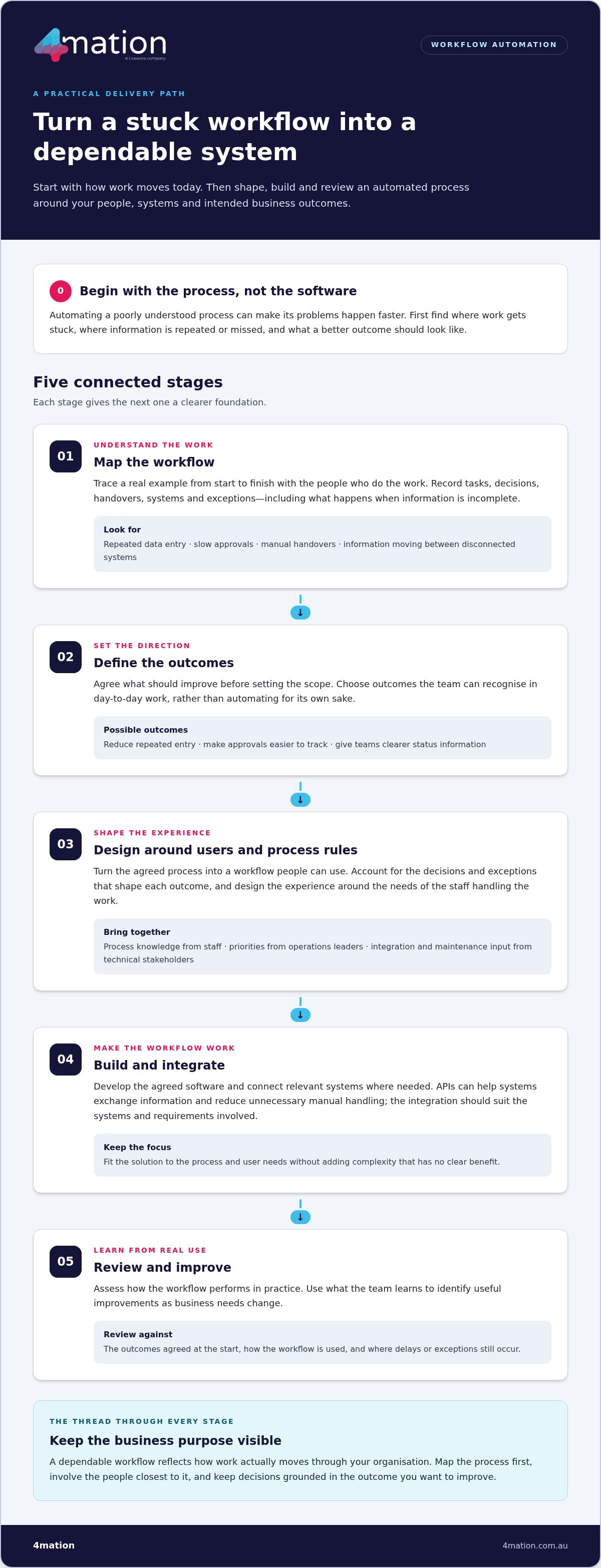
A workflow becomes dependable when it reflects how work actually moves through your organisation, including the decisions, handovers and exceptions that shape each outcome. Workflow discovery should come before development because teams need to understand the process and its purpose before designing software to improve it. That keeps custom workflow automation development grounded in operational needs rather than assumptions about what technology can fix.
A considered delivery process moves through connected stages:
- Map the workflow: Trace tasks, decisions, handovers, systems and exceptions with the people who do the work.
- Define outcomes: Agree what should improve, such as reducing repeated entry, making approvals easier to track or giving teams clearer status information.
- Design the solution: Shape the user experience and process rules around those outcomes.
- Build and integrate: Develop the agreed software and connect relevant systems where needed.
- Review: Assess how the workflow performs in practice and identify useful improvements.
Business users and technical stakeholders bring different, equally important perspectives. Staff who handle the process can explain where information is missed, which exceptions occur and what would make the workflow easier to use. Operations leaders can set priorities and define success. Technical stakeholders can assess integration requirements, data flows and how the solution will be maintained. IBM’s explanation of business process automation offers further context on how automation can streamline day-to-day operations.
Map the current process before designing the future workflow
Walk through a real example from start to finish. Record who acts, what information they need, which systems they use and what happens when a request is incomplete or needs another decision. This can reveal bottlenecks and repeated effort. It also helps separate process problems from technology gaps. Agree on the intended operational outcome before setting the scope, so the team can prioritise changes that serve a clear business purpose.
Build, integrate and test around real user needs
Once the process and outcomes are agreed, design and development turn them into a usable workflow. Where systems need to exchange information, APIs can connect them and reduce unnecessary manual handling. The integration approach should suit the systems and requirements involved, rather than add complexity without a clear benefit.
Test the solution against representative workflows, including routine tasks and relevant exceptions. Involve business users so they can check whether the steps, information and decisions make sense in practice. Plan the rollout and user support as part of delivery, then review the workflow once it is in use. If you’re considering a process change, talk with our team about your workflow goals.
Custom workflow automation vs AI tools and off-the-shelf platforms
The right approach depends on how closely an existing platform fits your process, how your systems need to connect and what business outcome you’re targeting. Custom workflow automation development isn’t automatically the best answer, and AI isn’t required for every automated process. Compare the options against the work your team needs to do and the value you expect to gain.
Configured platform
Process fit: Suits established workflows that align with available features. Integration: Depends on supported connections to your existing systems. Adaptability: Changes are shaped by the platform’s configuration options. User experience: Uses the platform’s interface. Ownership: Your team manages setup and ongoing configuration.
Custom software
Process fit: Can be designed around distinct business rules and handovers. Integration: Can address specific system connections. Adaptability: Can evolve with changing requirements. User experience: Can be shaped around user tasks. Ownership: Requires a plan for maintenance and future changes.
AI-enabled workflow components
Process fit: May assist a defined step, such as handling information that doesn’t follow a fixed pattern. Integration: Must fit the workflow and systems involved. Adaptability: Depends on the selected use and design. User experience: Should make the task easier, not add friction. Ownership: Needs oversight appropriate to its role in the process.
When can an existing platform handle the workflow?
A configured platform may be a sound choice when its standard features match a well-understood process and connect with the systems your team already uses. It can help you avoid building capabilities you don’t need. The practical test is whether the workflow runs without persistent workarounds or compromises that undermine the intended outcome.
When does custom software or AI add practical value?
Custom software may suit workflows with distinct rules, user needs or integration requirements that don’t fit neatly into standard configuration. AI can support a specific step where it offers practical value, but it shouldn’t be added simply because it’s available. For defined AI use cases, explore AI application development.
A simple decision rule: choose configuration when the process fits, custom software when the process or connections need a tailored solution, and AI only when a defined task benefits from it. In each case, judge the option by whether it improves the business outcome without creating unnecessary complexity.
How to scope custom workflow automation for value, adoption and lower delivery risk
A clear scope gives your team a shared view of what the workflow must improve, what the solution needs to do and how you’ll judge its performance. In custom workflow automation development, this clarity helps contain delivery risk and gives business and technical stakeholders a sound basis for decisions.
Define the outcome and boundaries before development
Start with the business problem, then identify the people and teams affected. A practical scoping sequence is:
- Set the objective: Describe the operational issue and the result you want, such as clearer approval status or less repeated data entry.
- Identify users: Include the people who initiate, review and complete the work, as well as those responsible for the process.
- Set boundaries: Separate essential workflow needs from optional enhancements so the initial scope stays focused.
- Record process details: Document assumptions, exceptions, dependencies on other systems or teams, and who owns key decisions.
- Choose success measures: Select measures that reflect the intended outcome, such as processing time, error rates or visibility of work in progress. Set targets against your organisation’s baseline, not arbitrary benchmarks.
Plan for adoption as well as functionality. Consider how users will learn the new workflow, who will support it, how access and information will be managed, and who will oversee maintenance. Agreeing these points early helps the solution operate reliably after launch and improve as business needs change.
Choose an engagement model and plan for ownership
The right delivery model depends on how well-defined the scope is and the capability your team needs. A fixed-cost project suits a clearly defined scope and is fixed cost, on time, on budget and bug-free. Ongoing Agile development supports work that will be prioritised and refined over time. Staff augmentation adds development capacity to your existing team, while a Service Desk can support ongoing software maintenance and improvement.
We work with you to match the engagement to your goals, delivery needs and ownership plans. Explore our software project engagement options and custom software development to understand how delivery can be structured around your workflow.
If you’re ready to turn a process challenge into a defined opportunity, discuss your workflow automation opportunity with 4mation.
How 4mation delivers and improves custom workflow automation
Reliable automation starts with your business goals, not a predetermined technology. In custom workflow automation development, 4mation works with you to understand the operational problem, the people who use the process and the systems involved. That shared understanding informs the software design and delivery plan, keeping the solution focused on practical business needs.
From workflow problem to fit-for-purpose software
Strategy, design, development and integration work together to take a process from an identified problem to software your team can use. We shape the workflow around its users, build the agreed functionality and connect relevant systems where needed. Each decision should support the outcome, whether that means reducing manual steps, improving access to information or making work easier to track.
Load & Go is one example: its web and mobile suite replaced manual workflows. The example shows how software can bring work into a digital experience. The right solution for your organisation depends on your own process and goals. Our continuous improvement and development service can support changes as your software and operational needs evolve.
Keep the workflow useful after launch
Launching a workflow is the beginning of its working life, not the end of delivery. Ongoing support and maintenance help keep software dependable, while planned improvements can respond to user feedback and changing business processes. Reviewing how the workflow is used can help your team identify an unclear step, an exception that needs attention or an adjustment that could make work flow more smoothly.
We can work with you across the lifecycle, from shaping the initial solution to supporting and improving it over time. Clear ownership matters too: your team should know who manages the process, who makes decisions about changes and how feedback is assessed. That creates a practical basis for evolving the workflow without losing sight of its original purpose.
To discuss a workflow challenge and explore a suitable path from process to software, talk with 4mation about custom workflow automation.
Turn a workflow challenge into measurable progress
Manual work doesn’t need to be accepted as part of doing business. Identify where a process slows your team down, define the outcome you want and involve the people who use the workflow. Then choose an approach that fits your process and systems, whether that means configuring an existing platform, building custom software or adding AI to a specific step.
Effective custom workflow automation development is about more than getting tasks done faster. A clear scope, suitable integrations and a support plan help make the solution useful in daily operations and adaptable as your business changes. Load & Go’s web and mobile suite, which replaced manual workflows, shows how software can turn an operational need into a practical digital solution.
4mation brings 25 years of client success and 40+ local tech specialists to help Australian organisations plan, build and improve business software. If you have a process ready for a better approach, talk with 4mation about your workflow automation opportunity. Start with a clear goal, then work with us to turn it into a practical solution.
Frequently Asked Questions
What is custom workflow automation development?
Custom workflow automation development is the design and development of software that coordinates tasks, decisions, data and handovers within a specific business process. It can connect existing systems or add purpose-built functions where standard tools don’t fit. The process starts by understanding the operational problem and the outcome your organisation wants, then shaping a solution around those needs rather than selecting technology first.
Which business processes are suitable for automation?
Processes with repeatable tasks, clear handovers or recurring data movement can be worth assessing. Examples include administrative processing, internal approvals, reporting and customer service workflows. Suitability depends on how consistently the process runs, which systems it uses and the value of improving it. Map the current steps, including exceptions, and define the intended outcome before deciding what to automate. Not every process needs a software solution.
Is custom workflow automation better than off-the-shelf software?
Not automatically. An existing platform may work well for a familiar process with straightforward requirements. Custom development may be appropriate if your workflow has distinct rules, needs tailored integrations or cannot be supported effectively by standard features. Compare options based on process fit, adaptability, user experience and ongoing ownership. The best choice is the one that supports your business outcome without adding unnecessary complexity.
How does AI fit into workflow automation?
AI can support selected workflow tasks when it addresses a defined business problem, such as handling particular information or assisting with a process decision. It isn’t necessary for every automation. Before including it, consider the task, data, users, integration needs and expected value. A practical solution may use conventional software to coordinate the workflow and apply AI only where it adds useful capability.
How do you reduce risk in a custom workflow automation project?
Reduce risk by agreeing on the process, users, intended outcome and project boundaries before development begins. Document assumptions, dependencies, integrations and exceptions so stakeholders understand what the solution needs to handle. Involve business users in design and testing, and plan for adoption, support and future improvement. The engagement model should also suit the project’s scope and how your team expects to work.
Can custom workflow automation integrate with existing business systems?
Yes, a solution can be designed to connect with existing systems where the project requirements and integration options support it. Discovery should identify which platforms need to exchange information, what data the workflow requires and where handovers happen. The design can then address relevant APIs or other integration methods. Each system has its own capabilities, so integration decisions should reflect the actual technical environment and business need.
What happens after a custom workflow automation solution launches?
Launch is one stage of the software lifecycle, not the end of it. Users may need support as they adopt the workflow, while the software may require monitoring, maintenance or improvement as business needs change. Agreeing who owns the process, handles support and approves changes helps keep the solution reliable. Regular feedback can also show where the workflow needs adjustment to remain useful in day-to-day operations.
About The Author
