Scaling Vibe Coded Apps for Production Readiness
Jowena BorralDigital Marketing Specialist

What if the app that impressed stakeholders in a demonstration isn’t ready for the demands of daily business use? A working prototype shows what’s possible, but it doesn’t prove the software is secure, reliable or maintainable. To make a vibe coded app production ready, first understand what’s behind the experience and what the application needs to do before it becomes part of a business-critical workflow.
If you’re unsure whether the generated code can be supported, or whether sensitive information and key processes are adequately protected, that uncertainty is understandable. Moving forward doesn’t automatically mean starting again. The next step is a business-first assessment: identify the gaps, consider their business impact and delivery risk, then set clear priorities.
This article explains how to move from demonstration to a controlled release, using evidence to guide decisions and a clear plan for ownership after launch. We’ll cover what to assess, how to choose between remediation, extension or redevelopment, and how ongoing support can help your application keep pace with changing needs. The aim is a practical path to software your people can use and your organisation can operate with confidence.
Key Takeaways
- Production readiness means more than a successful demo. Check whether the app can support real users, business workflows and planned changes.
- Before expanding its use, map the app’s users, critical processes, integrations, data flows and access arrangements.
- Turn business requirements into practical tests, including checks for invalid inputs, failures and key integrations.
- To make a vibe coded app production ready, prioritise improvements by business impact and delivery risk rather than assuming a full rebuild is needed.
- Plan a staged release and assign clear ownership for product decisions, maintenance, user feedback and future improvements.
What does it mean to make a vibe-coded app production-ready?
Vibe coding uses AI coding tools to generate or change application code through prompts and repeated iteration. It can help turn an idea into a working prototype quickly, but a successful result on screen doesn’t show whether the application can support your organisation’s needs over time.
Production readiness depends on the app’s intended use. An internal tool for a small team has different demands from an application used by customers or relied on for a critical business process. The goal isn’t automatically to rebuild. Assess the app against the users, workflows, data and support requirements it must serve, then decide whether to improve, extend or replace parts of it.
Why a working demonstration is not proof of operational readiness
A prototype may handle a straightforward example but fail when someone enters unexpected information, loses access or repeats an action. These everyday exceptions can disrupt work or produce incorrect results.
Other important needs are less visible in a demo. Access controls help ensure people only see or change what they’re authorised to. Monitoring helps teams identify problems, while recovery plans help restore service or data after a failure. The consequences depend on the app: errors could affect customer service, staff productivity, sensitive information or business continuity.
What production readiness should prove
Production readiness is evidence that an application can meet its defined user and business needs, operate reliably and securely, and be maintained as those needs change. That evidence should reflect the app’s actual purpose, not an assumed standard that fits every organisation.
Set expectations that can be checked. Define which users can access particular information, how the app should respond to invalid inputs, and what should happen if an important integration is unavailable. Agree how key tasks should perform under expected conditions and how the team will identify and resolve faults.
Code and architecture matter because they affect how safely the application can be changed and supported. Shortcuts made for speed can create Technical debt, where choices that help deliver now may increase the effort of future maintenance. That doesn’t mean the code must be rewritten. Your team needs enough understanding of its structure and dependencies to judge the impact of a change.
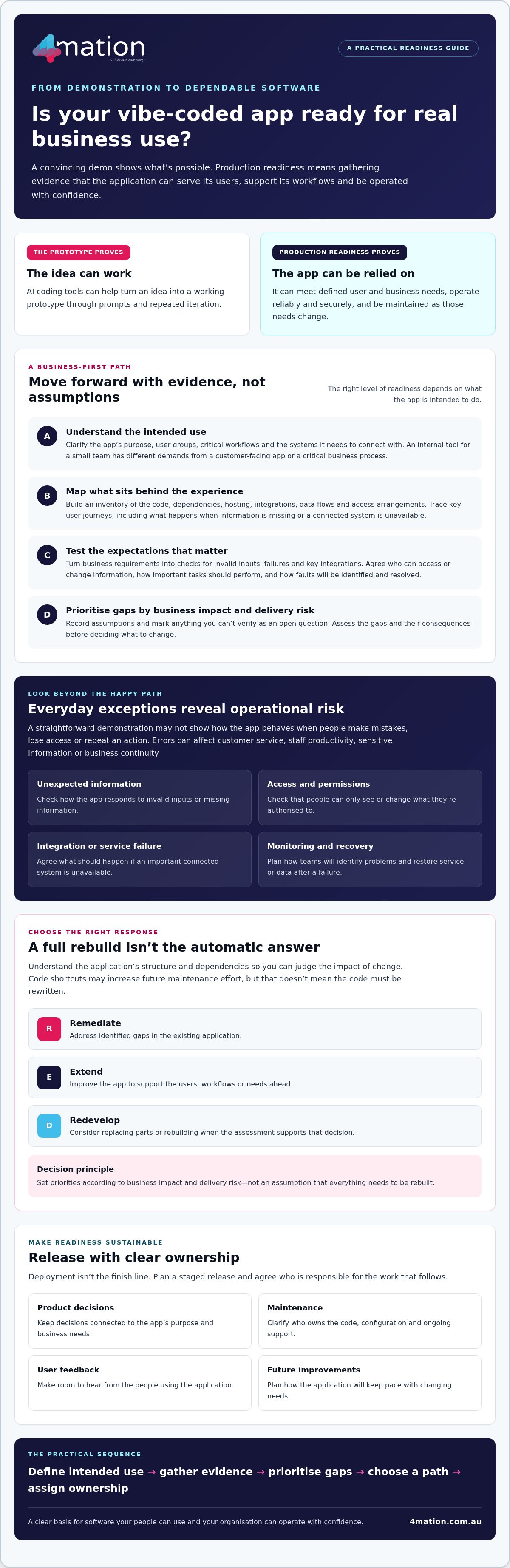
To make a vibe coded app production ready, agree with stakeholders what “ready” means for its intended use, then gather evidence against those expectations. That gives decision-makers a sound basis for choosing the next step instead of relying on a convincing demonstration alone.
Assess the app’s code, architecture and data before expanding its use
Before more people rely on the app, establish what it does now and what the organisation needs it to do next. Clarify its purpose, user groups, critical workflows and the systems it must connect with. A prototype built to simplify one team’s task may need a different level of review before it supports a process used across the organisation.
Build an inventory of the application’s code, dependencies, hosting, integrations, data flows and access arrangements. Trace key user journeys from start to finish, including what happens when information is missing or a connected system is unavailable. Record assumptions, such as users entering complete information or a process always finishing in one session. Mark anything you can’t verify as an open question, not an established fact.
Can your team understand and change the generated code?
Review whether the application has a clear structure, whether important decisions are documented and whether the team can identify who owns the code and its configuration. Check dependencies and how changes are managed without assuming a particular technology stack. If a small form adjustment could affect a key approval workflow, review that area closely before extending the app. NIST’s Secure Software Development Framework (SSDF) offers practices for building security into software development, rather than treating it as a final check.
Does the app handle business data appropriately?
Map the information that enters the application, where it goes, which connected systems receive it and what users can access. Check whether permissions reflect people’s roles and responsibilities. For example, a staff member who submits a record may not need the ability to view or change every record. Assess integrations and data handling against your organisation’s requirements, and seek specialist advice if the impact or handling of information is unclear.
Use your findings to create a prioritised view of the work. Consider the potential business impact of each issue, how likely it is to occur and the effort needed to investigate or address it. A confirmed access gap affecting a core workflow may take priority over a documentation improvement. Keep an unknown data flow visible until someone verifies it. This gives your team a reasoned basis for deciding whether to remediate, extend or redevelop parts of the app.
If you need help assessing the application against your goals, you can discuss your software assessment with 4mation.
Prove security, quality and reliability before real users depend on it
Testing turns business requirements into evidence about how the application behaves. For each important requirement, define a test case with a clear expected outcome. For example, if a user submits an incomplete form, specify whether the app should explain what’s missing, prevent submission or allow a draft to be saved.
Run these checks in a controlled environment before release. Include normal use, invalid inputs, failure conditions and important integrations. Use representative scenarios without putting live business operations at risk. Testing reduces uncertainty, but it can’t prove an application will never fail. It helps your team understand what works, what remains unresolved and what to decide next.
Which tests should happen before release?
Start with repeatable tests for core workflows, so the team can check that changes haven’t broken essential behaviour. Ask relevant users to validate usability too. They may spot confusing steps or missing information that technical checks won’t reveal.
Test how the app responds when an integration returns an error, a service is unavailable or a task needs to be retried. Record each defect with its severity, an owner and a decision to fix, defer or accept it. If you defer an issue, document why and who approved that decision. This makes trade-offs visible to the people accountable for the release.
How should you review security and reliability?
Have appropriately skilled reviewers check who can access the application and its data, whether sensitive configuration or secrets are exposed, and whether third-party dependencies are understood and maintained. Match the depth of review to the application’s purpose and the potential consequences of a problem.
Agree availability and recovery expectations with the people responsible for operations. They should know which interruptions matter most, how the team will identify a fault and what steps are needed to restore service or recover data. Set expectations around business needs, not an arbitrary threshold.
Use the current OWASP Top 10 as a reference when considering common application security risks, and confirm which guidance applies to your app. It can help frame a review, but it isn’t evidence that an application is secure on its own.
To make a vibe coded app production ready, consider test results and review findings alongside the business impact of open issues. This gives decision-makers a clearer basis for approving release, requiring changes or accepting a documented risk.
Plan a controlled release instead of treating deployment as the finish line
Deploying the app makes it available. It doesn’t confirm that it’s ready for the people and processes it will support. A controlled release connects technical steps to a business decision: is the app suitable for its intended users, and what will the team do if problems arise?
Use a release sequence that suits the app’s purpose and potential impact:
- 1. Set a baseline. Record the current version, known issues and expected behaviour so you can compare results after release.
- 2. Prepare a test environment. Check that the setup supports realistic validation without disrupting live work.
- 3. Validate. Confirm that agreed checks have passed and that outstanding issues have an owner and an acceptance decision.
- 4. Release gradually. Start with an agreed audience or workflow if the context allows, rather than extending access to everyone at once.
- 5. Review. Check agreed signals, gather feedback and decide whether to continue, adjust or pause the rollout.
What belongs in a practical release plan?
Keep an accessible record of the release scope, known limitations, dependencies and acceptance decisions. Name who approves the release, communicates changes, provides support and handles escalation. Confirm those people understand their responsibilities and are available during the agreed release period. This gives everyone a shared view of what’s changing and what still needs attention.
Deployment instructions explain how to put a change live. A release plan also covers who authorises that change, who is affected and how the organisation will respond to the results. Keep those decisions clear even when the technical deployment is straightforward.
How can you limit disruption when the app goes live?
Choose monitoring signals that reflect system behaviour and business outcomes. These might include errors in a key workflow, failed integrations or feedback from the first users. Agree who reviews each signal and who can pause the rollout. If the app supports an important process, document rollback or recovery steps before launch, and make sure the responsible people know when to use them.
That preparation helps your organisation make a vibe coded app production ready without treating deployment as proof of success. A measured release creates an opportunity to learn from real use while keeping decisions and responsibilities visible. To plan an assessment or release pathway with 4mation, discuss your application with our team.
Build clear ownership and ongoing support into your production-ready app
A production-ready application needs people accountable for what happens after release. Assign clear ownership for product decisions, the codebase, access, documentation, maintenance and user feedback. Without it, even straightforward changes can stall, and important knowledge can remain with the person who built the prototype.
Turn assessment findings and user feedback into an improvement backlog. Prioritise each item by business value, technical risk and available capacity. For example, resolving an issue that affects a core workflow may take precedence over adding a lower-priority feature. Review the backlog regularly so the work continues to reflect your organisation’s needs.
Which engagement model fits the work ahead?
The right model depends on how clearly you can define the work and where your team needs support:
- Fixed-Cost: Consider this when the outcome and scope are clearly defined. 4mation presents its Fixed-Cost projects as fixed cost, on time, on budget and bug-free. Confirm the scope and terms for your project before agreeing on the work.
- Ongoing Agile Development: An iterative approach may suit improvement work when priorities need to evolve as users provide feedback.
- Staff Augmentation: Consider this when your internal technology team needs additional specialist capability working alongside it.
- Service Desk: This can suit organisations seeking ongoing technology support, maintenance and development after launch.
Assess these options against your goals, capacity and delivery risks. No single model is the default choice for every application.
How can a development partner help without discarding your prototype?
A useful partner starts with your business goals, users and operational requirements, then examines the code and integrations before recommending a path. Ask for prioritised options that explain what can be retained and distinguish between remediation, extension and redevelopment. This gives you a basis for investment decisions without assuming the prototype needs a full rebuild.
Where AI capability is part of the application’s purpose, AI application development may be relevant. After release, ongoing technology support and maintenance can help keep ownership and operational needs in view. The right support depends on what your application requires and how your organisation plans to manage it.
To make a vibe coded app production ready, connect technical work to named owners, business priorities and a practical plan for continued improvement. If you’re weighing up the next step, talk with 4mation about your application.
Turn your prototype into a supported business application
A working prototype can be a valuable starting point, but expanding its use calls for clear evidence, ownership and a release plan. Assess the app against the work it needs to do, prioritise improvements by business impact, and decide how your team will support it after launch. The right path may be remediation, extension or redevelopment, depending on what the assessment reveals.
To make a vibe coded app production ready, focus on practical steps that help your organisation operate, secure and improve the application over time. 4mation works with you to understand your goals before recommending an approach, drawing on 25 years of client success, 40+ local technology specialists and AWS Select Consulting Partner status. Its full-lifecycle capability spans strategy, design, development, integration and ongoing support.
Discuss your app’s production-readiness needs with 4mation and explore a clear next step for your organisation. With a considered plan and the right ownership in place, your prototype can become a foundation for useful, sustainable business software.
Frequently Asked Questions
Can a vibe-coded app be used in production?
Yes, if assessment shows it’s suitable for the people, processes and information it will handle. A successful demonstration alone isn’t enough to establish that. Before relying on the app, check that it meets defined business needs, handles expected and unexpected use, protects access to information and has a support plan. The level of assurance should reflect the app’s purpose and the consequences of errors or interruptions.
How do I make a vibe-coded app production-ready?
Start by defining the app’s purpose, users and critical workflows. Review its code, dependencies, hosting, integrations, data flows and access arrangements, then test important scenarios in a controlled environment. Prioritise findings by business impact, likelihood and effort. Before release, agree on approval, monitoring, recovery and ownership. This process helps you make a vibe coded app production ready through evidence-led improvements, rather than assuming a particular technical fix is always needed.
Is AI-generated code safe to deploy?
AI-generated code shouldn’t be treated as safe or unsafe based only on how it was created. A suitably skilled reviewer should assess how it works, including access controls, handling of sensitive information, configuration, dependencies and behaviour when something goes wrong. Test the application against its intended use and address significant findings before release. These checks can reduce uncertainty, but no review or test can guarantee that software will never fail.
What should I check before launching a vibe-coded app?
Confirm that core user workflows work as expected, including invalid inputs, errors and important integrations. Check that access reflects users’ responsibilities and that information moves only where intended. Document known limitations, open issues and decisions to fix, defer or accept them. Also name who approves the release, communicates changes and responds to problems. A controlled release plan should include agreed monitoring signals and a clear rollback or recovery approach.
Do I need to rebuild my vibe-coded app to make it production-ready?
No. A full rebuild isn’t automatically necessary. An assessment may show that targeted fixes, clearer documentation or changes to particular components are enough to support the app’s intended use. In other cases, extending or redeveloping parts of the application may be more appropriate. Base that decision on the condition of the code, business requirements, data and integrations, and the effort and risk involved in each option.
Who should maintain a vibe-coded app after launch?
Assign an accountable product owner and make sure someone has responsibility for the codebase, access, documentation, maintenance and user feedback. Your organisation may have the people and skills to manage this internally, or may need specialist development or ongoing technology support. Set a prioritised improvement backlog and review it as needs change. Clear ownership helps ensure issues are addressed and future changes don’t depend on undocumented knowledge.
About The Author
