Cloud migration and modernisation: a 2026 practical guide
Jowena BorralDigital Marketing Specialist

What if moving a legacy system to the cloud simply moved its problems with it? Cloud migration and modernization can create room to scale, improve reliability and respond to changing business needs, but only when each workload decision supports a clear outcome. A rushed move can leave you with the same constraints in a new environment.
If ageing systems are slowing change, unclear dependencies can make it difficult to judge what to move first and what risks a project may introduce. Replacing everything at once isn’t the only path forward. You can make progress in stages, balancing business priorities with the need to keep essential services running.
This practical guide explains the difference between migration and modernisation, and how to plan a staged approach around business goals. You’ll learn how to assess dependencies, delivery risks and support needs, then decide whether each system should move as it is, be improved or be replaced. The aim is a clearer path to lasting value, without unnecessary disruption or complexity.
Key Takeaways
- Separate moving systems to the cloud from modernising how they work, so each investment has a clear business purpose.
- Assess each system’s users, dependencies, data flows and operational importance before setting its migration scope.
- Choose whether to move, replatform, refactor, replace or retain each workload based on its needs and trade-offs.
- Plan cloud migration and modernization in stages, with success measures based on your organisation’s starting point.
- Look for a technology partner who can connect business strategy, system integration, custom development and ongoing support.
What cloud migration and modernisation mean for your business
Older systems can make it harder to connect services, respond to customer needs or introduce new ways of working. Moving them raises valid questions about continuity: what depends on each system, and how can essential work keep running during a change? Distinguishing migration from modernisation helps you answer those questions and choose the right scope.
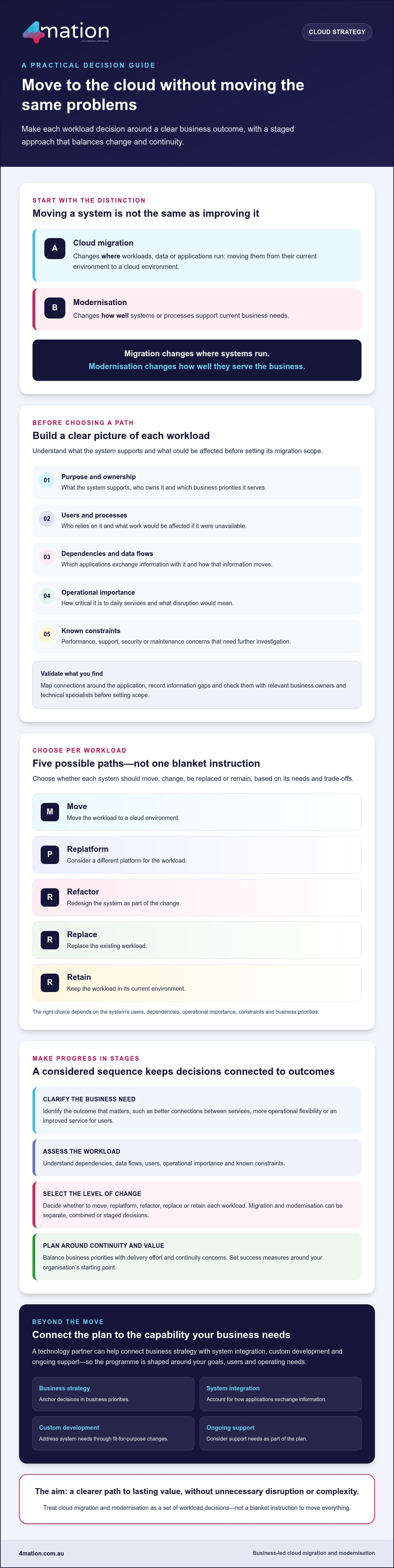
Cloud migration means moving workloads, data or applications from their current environment to a cloud environment. Modernisation means changing systems or processes so they better support current business needs. One changes a system’s location; the other changes its fitness for purpose. In short: migration changes where systems run; modernisation changes how well they serve the business.
How cloud migration differs from modernisation
A workload can move with few changes, or it can be redesigned as part of the move. These are separate decisions. You might migrate first to address a hosting constraint, modernise first to improve a process, or plan both together when redesigning the system is central to the business case. You can also stage the work, moving a system before making further changes once its needs are clearer. The Software modernization overview provides context on the relationship between application migration and modernisation.
For example, a business might move an existing reporting application to a cloud environment without changing how staff use it. Later, it could update the application so information connects more effectively with other business systems. The first step changes where the application runs; the second changes how it supports users and operations. Neither sequence suits every organisation.
Why organisations consider a cloud programme
The case for change usually starts with a business need, not a preference for a particular platform. You may want systems to share information more effectively, give teams greater operational flexibility or improve a service that no longer meets user needs. A cloud programme can create an opportunity to address those needs, but moving an application alone won’t necessarily resolve its limitations.
Start by considering who uses each system, what work it supports and which constraints it creates. A system that underpins a critical service may need a different approach from one used for a less time-sensitive task. Priorities matter too: improving integration may be more valuable than redesigning an application, while another business may need to change the application itself. Treat cloud migration and modernization as a set of business decisions, not a blanket instruction to move everything.
The aim is to choose a level of change that fits the need. Weigh the value of improvement against continuity concerns and delivery effort to make a considered case for what to move, what to modernise and when.
How to assess workloads before choosing a cloud migration path
Choosing a destination before understanding the workload can leave dependencies undiscovered and business risks unclear. Start with the outcomes your organisation needs, then use technical discovery to understand what each system requires. A provider checklist may help compare options, but it can’t tell you which applications matter most to users or what disruption your business can accept.
Build a clear picture of each workload before deciding whether, when or how to move it. Record:
- Purpose and ownership: what the system supports, who owns it and which business priorities it serves.
- Users and processes: who relies on it and what work would be affected if it were unavailable.
- Dependencies and data flows: which applications exchange information with it and how that information moves.
- Operational importance: how critical it is to daily services and what disruption would mean.
- Known constraints: performance, support, security or maintenance concerns that need further investigation.
What to learn about each application and its dependencies
Map the connections around each application, not just the application itself. A system may rely on another service for data, support a manual business process or serve users who aren’t obvious from technical records. Note these relationships alongside known concerns, without assuming their cause. Mark information gaps and validate them with relevant business owners and technical specialists before setting scope.
This shared view helps you identify where a change could have wider effects. For example, moving an application that exchanges information with several other systems may require coordination beyond the application team. Confirm who owns each connection and what needs to keep working during the change.
How to identify candidates for early migration
Compare workloads by business importance, complexity, dependencies and readiness. A system with few connections and a clear owner may be easier to assess and move. A highly connected application, or one with unknown dependencies, may need deeper discovery or redesign first. The simplest workload isn’t automatically the best first move if it contributes little to your priorities or doesn’t help test an important part of the programme.
Use the assessment to make trade-offs visible: which workload offers meaningful value, which is ready for change, and where disruption would carry the greatest consequence? Prioritise workloads by business value, dependencies and change readiness. This gives decision-makers a shared basis for sequencing work and seeing where more information is needed.
For cloud migration and modernization, a sound assessment connects technical facts to business choices. If you’d like to discuss how to assess your systems and priorities, get in touch with our team.
Which cloud migration and modernisation approach fits each system?
Not every application needs a redesign before it moves. Choose a path for each system based on its condition, dependencies, business value and your organisation’s tolerance for change. The right cloud migration and modernization approach balances the improvement you need with the effort and disruption your business can manage.
These five options offer a starting point for discussion, not a fixed sequence or promise of a particular result:
| Approach | What it means | Trade-offs to consider |
|---|---|---|
| Lift-and-shift | Move the application with few or no changes. | Limits redesign during the move, but existing limitations may remain. Effort and disruption depend on the system and its dependencies. |
| Replatform | Move the application while making targeted changes to how it runs. | May address specific constraints, but requires more change than a largely unchanged move. Future flexibility depends on the choices made. |
| Refactor | Change the application’s underlying design or code to better meet business needs. | Can support more substantial changes, but involves greater redesign and needs careful planning around users and connected systems. |
| Replace | Move the business function to a different application or service. | May better fit current needs, but requires planning for user adoption, data and integration. |
| Retain | Keep the application where it is for now. | Avoids immediate change, but leaves existing constraints in place and may affect plans for connected systems. |
When a straightforward migration may be appropriate
A largely unchanged move may suit a workload when relocation is the immediate business priority and its current functionality remains adequate. It can also be a considered first step if a larger redesign needs separate planning. However, moving an application doesn’t remove its existing limitations. Review its support needs, integrations and impact on users before deciding, and don’t assume this path will always be faster, cheaper or safer.
When to modernise, replace or retain an application
Consider replatforming or refactoring when the system’s current design prevents improvements your business needs, such as better integration or more maintainable functionality. Replacement may make more sense if another application better supports users and business processes. Retaining a system can be reasonable when it still meets its purpose or when dependencies make change unsuitable for the current stage.
Base the decision on user needs, integration requirements, maintainability and organisational priorities. You don’t need to redesign every system at once. Select an approach for each workload, make the trade-offs visible and stage change where that better protects continuity.
How to plan a cloud migration in manageable stages
A staged plan gives your organisation clearer decisions, defined ownership and opportunities to learn before the next workload moves. It also keeps delivery connected to business goals rather than treating migration as a technical exercise alone.
Use a practical sequence:
- Set outcomes: agree what the programme needs to improve, such as a business process, service or system constraint.
- Assess systems: document each workload’s purpose, users, dependencies, operational importance and known risks.
- Choose an approach: decide whether to move, adapt, redesign, replace or retain each system.
- Deliver in stages: sequence work around dependencies, organisational readiness and the consequences of disruption.
- Review and adjust: check results against agreed measures and use what you learn to inform later stages.
Define success before delivery starts. Record an organisation-specific baseline, then agree how you’ll measure the intended outcome. If the goal is to improve a business process, for example, establish how it currently works and what change would count as useful. Avoid generic benchmarks: measures should reflect your users, priorities and starting point. Assign an owner to each measure so progress and decisions remain clear.
How to reduce disruption during migration
Prepare the people and processes around the workload, not just the technology. Identify business owners, technical decision-makers and escalation paths before moving a business-critical system. Map dependencies and agree who will coordinate with connected teams. Tell users what is changing, when they need to act and where they can raise issues.
Plan validation around real business processes. Ask the people who rely on the system to check that key tasks work as expected, and agree acceptance criteria before the move. The delivery team should also assess and document continuity arrangements, including whether a rollback plan is needed. These steps clarify responsibilities and responses if testing identifies an issue.
What to review after workloads move
A move isn’t complete just because an application is available in its new environment. Confirm that users can complete their work, integrations exchange information as intended and agreed measures reflect the result. Review performance, operational responsibilities and unresolved issues with the relevant business and technical owners. Record gaps and assign follow-up actions.
Ongoing monitoring and improvement can help teams identify emerging issues and keep the system aligned with business needs. Agree who will review its operation, manage changes and address problems as it transitions into business-as-usual support. This connects cloud migration and modernization with lasting operational value.
If you’re planning a staged programme, talk with our team about your migration priorities.
How a technology partner can support cloud modernisation beyond migration
A successful migration is not the end of the work. Your systems still need to support users, connect with other applications and adapt as business priorities change. A technology partner can help carry the programme’s intent from planning through to ongoing improvement, rather than treating the move itself as the only measure of success.
What to look for in a cloud modernisation partner
Choose a partner who starts by understanding your business goals, users, existing systems and constraints. They should connect that context to technical discovery and delivery decisions, explain trade-offs plainly and make ownership clear. Ask how they’ll communicate progress, manage dependencies and help your team address issues after implementation.
Look for support that fits the full lifecycle. Strategy and solution design should inform custom development and system integration where needed. Ongoing support can help maintain and monitor software and identify opportunities to improve it. Agree the scope and responsibilities with your organisation rather than making assumptions.
How 4mation can help plan the next step
At 4mation, we work with you to understand what your systems need to achieve and what constraints shape the work. Our relevant capabilities include cloud services, custom development, system integration and ongoing technology support. These services can connect migration decisions with broader modernisation priorities while keeping the focus on practical business outcomes.
4mation is an AWS Select Consulting Partner. This credential is not a guarantee of a particular migration result. The right approach still depends on your workloads, requirements and goals. 4mation also brings 25 years of client success and a team of 40+ local tech specialists, as stated on its About page.
After migration, agreed support arrangements can help maintain and monitor applications, address unresolved issues and identify improvement opportunities. Explore technology support and maintenance to understand one part of that ongoing picture. Clear ownership helps delivery transition into business-as-usual operations.
Cloud migration and modernization is most valuable when the move supports what your organisation needs next. To discuss your goals and current technology environment, discuss your cloud modernisation goals with 4mation.
Make your next cloud decision count
Cloud migration and modernization creates lasting value when each system’s path reflects your business priorities. Assess workloads before choosing an approach, then deliver changes in stages with clear success measures, ownership and continuity plans. Migration can be a starting point, while ongoing support and improvement help keep systems aligned with your needs.
4mation brings 25 years of client success and a team of 40+ local tech specialists, as stated on its About page. As an AWS Select Consulting Partner, 4mation can bring relevant platform experience to the conversation. Its capabilities span strategy and design through development, integration and ongoing support, helping connect decisions across your modernisation programme.
You don’t need to plan every system change at once. Start with your goals, current environment and the workloads that matter most. Talk with 4mation about your cloud migration and modernisation plans and explore a practical next step for your organisation.
Frequently Asked Questions
Is cloud migration the same as cloud modernisation?
No. Cloud migration moves workloads, data or applications to a cloud environment. Cloud modernisation changes systems or processes so they better support current business needs. A workload might move with few changes and be modernised later, or both decisions may be planned together. The right choice depends on what the business needs from the system, its existing constraints and how much change users and operations can manage.
Can you migrate applications to the cloud without modernising them?
Yes. You can move an application with few or no changes, often called lift-and-shift. This may suit a system that still meets its purpose when relocation is the immediate priority. However, moving it won’t automatically resolve existing limitations. Before proceeding, review its dependencies, support needs and impact on users, then decide whether to address constraints during the move or in a later stage.
How do you decide which applications to migrate first?
Compare applications by business value, operational importance, dependencies, complexity and readiness for change. A system with clear ownership and few connections may be easier to assess, but it isn’t automatically the most valuable first move. Consider which workloads support current priorities and what disruption would mean for users and services. The cloud migration and modernization sequence should reflect these factors, not simply follow a provider’s checklist.
What happens if a cloud migration disrupts business operations?
Prepare for disruption before a move begins. Agree who can make decisions, how teams will escalate issues and how users will validate essential business processes. Assess and document continuity arrangements, including whether a rollback plan is appropriate for the workload. If a problem arises, clear responsibilities and agreed response steps help teams coordinate. The arrangements should reflect the application’s importance and the organisation’s needs.
Does every legacy application need to be modernised before migration?
No. Assess each application on its own. You may move one largely unchanged, replatform or refactor another, replace a system that no longer fits, or retain an application for now. Consider user needs, dependencies, maintainability and business priorities before deciding. Staging the work can help your organisation manage change, but understand any limitations left in place and include them in future planning.
How do you measure whether cloud modernisation is delivering business value?
Set success measures before work starts, based on the business outcome you want and your organisation’s baseline. If the aim is to improve a process, document how it currently works and agree what improvement would matter to users or operations. After delivery, compare results with those measures and review system performance, integration and unresolved issues. Avoid generic benchmarks that don’t reflect your starting point or priorities.
Can a technology partner support systems after cloud migration?
Yes. A technology partner can help maintain and monitor software, address agreed support needs and identify opportunities for ongoing improvement after migration. Clarify responsibilities, communication and the scope of support so your team knows who manages each part of the system. 4mation’s capabilities include managed services and support, proactive monitoring, maintenance and ongoing platform optimisation, subject to the needs and arrangements agreed with your organisation.
About The Author
