How to Make Your Vibe Coded Product Production-Ready
Jowena BorralDigital Marketing Specialist

A working prototype proves an idea can work. It doesn’t yet prove it can support real customers or business-critical workflows. If you’re searching for “help to make my vibe coded product ready”, the next step isn’t automatically to start again. First, understand what the product needs to do reliably for your business and users.
AI-assisted development can help you move quickly from concept to a working product. Before investing further, it’s sensible to assess security, testing, performance and ongoing support. Gaps in these areas don’t mean the prototype has failed. They show what needs to be assessed and prioritised before a wider release.
This article explains what production readiness involves and how to plan a practical path from prototype to a secure, supportable product. You’ll learn how to identify the most important gaps, connect improvements to business and user needs, and decide when an experienced software partner can help. The aim is to preserve what’s working, address material risks and invest in the next stage with greater confidence.
Key Takeaways
- Production readiness means your product can support its intended users and business workflows, with clear ownership beyond launch.
- Assess critical user journeys, data flows, integrations, access controls, testing and operational visibility before deciding where to invest.
- A full rebuild isn’t the default. Compare keeping, improving or replacing components based on risk, maintainability and business value.
- Move towards release in stages, linking prioritised fixes with verification, a controlled launch and ongoing monitoring.
- If you need help to make my vibe coded product ready, a partner can assess what you’ve built and shape a path around your users and goals.
What does it mean to make a vibe-coded product production-ready?
A convincing prototype shows that an idea can work. A production-ready product can reliably support its intended users and business workflows, meet appropriate security expectations, and be maintained when something goes wrong.
Production readiness is the evidence that a product can deliver its intended value under real operating conditions and be supported when issues arise. It isn’t a judgement on whether AI helped write the code. It’s a business decision based on the product’s purpose, the people who rely on it, the data it handles and the consequences of failure.
The right standard depends on the product. An internal tool for a low-risk task has different needs from a customer-facing product that handles sensitive information or supports a critical workflow. Set expectations for the actual use case rather than applying the same checklist to every product.
Why a working prototype is not the same as a production product
A demo usually follows a planned route. Real users take different paths: they enter unexpected information, lose access, return to incomplete work or need to correct an error. A product needs to handle these situations without losing data or exposing information to the wrong person.
Reliable data handling, appropriate permissions and a way to recover from failures protect more than the software. They help maintain customer trust, keep staff productive and give the business a sound basis for relying on the product.
Set readiness criteria around your users and business goals
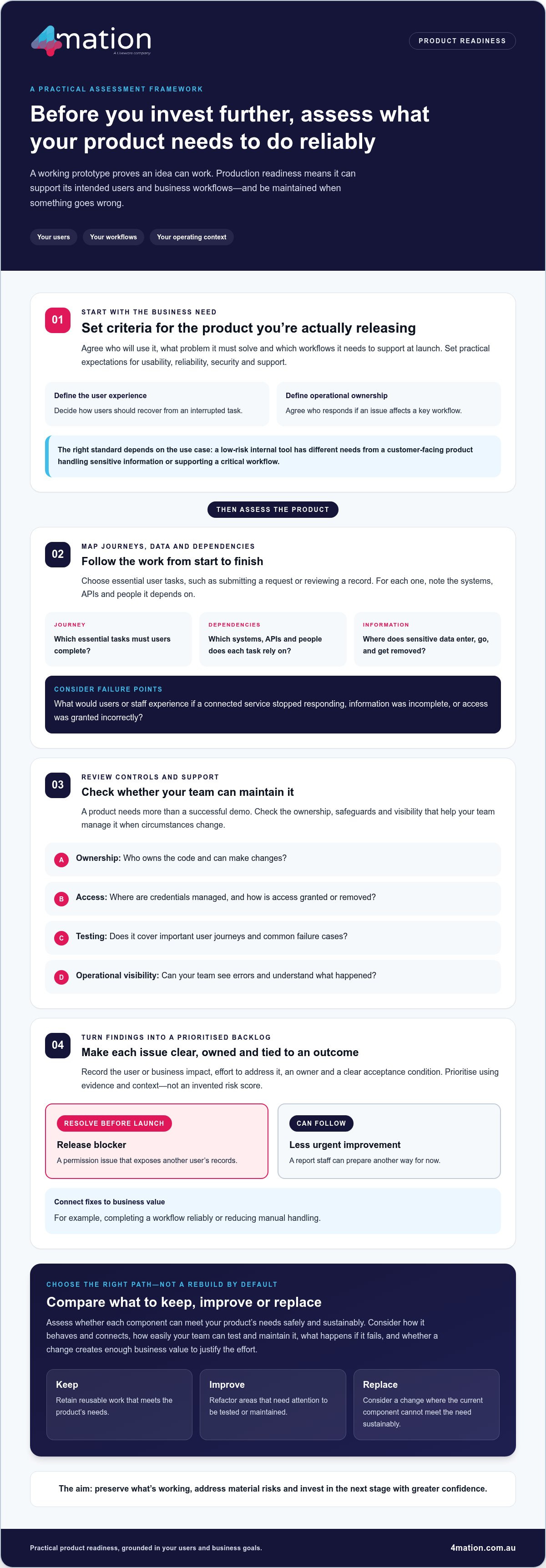
Start by agreeing who will use the product, what problem it must solve and which workflows it needs to support at launch. Then define what acceptable usability, reliability, security and support mean in practice. For example, decide how users should recover from an interrupted task and who will respond if an issue affects a key workflow.
This business-first approach reflects the wider New Product Development process, where understanding customer needs informs the journey from idea to market. Your product’s intended users and operating context matter too. 4mation works with organisations across different industries and sectors, where workflows and priorities can vary. If you need help to make my vibe coded product ready, turn those needs into clear release criteria first. This gives your team a practical basis for assessing the product and deciding what to change.
How to assess your vibe-coded product before investing further
A structured assessment helps you avoid spending on fixes that don’t address the product’s real needs. Start with its purpose and the user journeys it must support. Then trace the technology behind those journeys and record what needs attention. This gives decision-makers a shared view of what’s ready, what needs work and what can wait.
Map critical journeys, data and external dependencies
Choose the essential tasks users need to complete, such as submitting a request or reviewing a record. For each journey, note the systems, APIs and people it depends on. Trace sensitive information from the point it enters the product through to where it’s stored, shared or removed. This makes dependencies and potential failure points easier to see.
Ask what users and staff would experience if a connected service stopped responding, information was incomplete or access was granted incorrectly. The likely consequence helps you judge the importance of each issue.
Review ownership, controls and operational visibility
Confirm who owns the code and can make changes, where credentials are managed, and how access is granted or removed. Review what testing covers, including important user journeys and common failure cases. Check whether the team can see errors and understand what happened when something goes wrong. These checks show whether the product can be maintained, not just demonstrated.
Turn findings into a prioritised product backlog
Record each finding with its user or business impact, the effort to address it, an owner and a clear acceptance condition. For instance, a release blocker might be a permission issue that exposes another user’s records. A less urgent improvement might be a report that staff can prepare another way for now.
Separate issues that must be resolved before launch from improvements that can follow. Prioritise using evidence and context, not an invented risk score. Each backlog item should connect to a business outcome, such as completing a workflow reliably or reducing manual handling. 4mation’s software development capability can support assessment and product improvements suited to your needs.
If you’re thinking, “I need help to make my vibe coded product ready,” a clear assessment is a practical place to begin. It can also show what to consider next in a guide to scaling vibe-coded apps for production readiness, where growth brings new demands on performance and operations. Talk with 4mation about your product.
Rebuild your vibe-coded product for production?
A complete rebuild isn’t the automatic next step. Weigh it alongside retaining or refactoring what you already have. The right choice depends on whether each component can meet your product’s needs safely and sustainably, and whether changing it creates enough business value to justify the effort.
A code quality audit can help separate reusable work from areas that need attention. It should consider how components behave and connect, how easily your team can test and maintain them, and what happens if they fail. The aim isn’t to favour a particular technology or coding style. It’s to make an evidence-based decision that supports your users and business goals.
When to retain, refactor or replace existing components
Use the evidence to decide what happens next:
- Retain components that meet agreed requirements, work reliably and have clear ownership for future changes.
- Refactor areas where the structure makes testing, safe updates or planned product improvements difficult.
- Replace a component when the review shows it can’t sustainably meet an essential requirement, even with targeted improvements.
These choices can apply to different parts of the same product. You might keep a validated user interface, improve the way it handles data and replace a connection that can’t support an important workflow. That can be a more considered path than treating the entire product as one indivisible piece of work, an approach frequently adopted by digital product agencies such as oxedge.com when transitioning early prototypes into reliable software.
How to protect the product value already created
Keep what you’ve learned. Validated user journeys, feedback and product decisions can guide changes to the underlying implementation. Before changing a critical workflow, define its expected behaviour and use regression tests to check that existing functions still work. Clear acceptance criteria help your team confirm that a change solves a real problem.
Separate technical preference from demonstrable need. A component may not follow someone’s preferred approach, but that alone doesn’t justify replacing it. A stronger case is evidence that it creates a material obstacle to security, maintenance, user needs or planned development.
This measured approach also helps manage delivery risk. Document dependencies, make changes in manageable stages and verify the outcomes that matter before expanding them. If you need help to make my vibe coded product ready, 4mation can assess the existing product with you and identify a practical path forward. Discuss your product with 4mation.
What practical steps take a vibe-coded product from prototype to release?
A controlled release turns readiness work into a sequence the team can manage. Security, testing, deployment and operational ownership need to work together: test results inform release decisions, deployment plans account for known limitations, and monitoring helps the team respond once the product is in use.
Use a staged approach:
- Prioritise remediation. Address issues that could undermine essential user journeys, expose data or prevent the team from supporting the product. Give each item an owner and a clear outcome.
- Verify agreed requirements. Test the critical journeys, permissions, integrations, error handling and recovery against acceptance criteria. Use automated checks where they provide repeatable feedback on important behaviour.
- Decide whether to release. Record unresolved limitations and assess their effect on users and business operations. A limited release can help gather feedback, but only if it suits the product, its users and the consequences of an issue.
- Monitor and improve. Track product behaviour, review feedback and assign responsibility for follow-up fixes and improvements.
Each stage informs the next. For example, testing may show that a journey works except when an external service is unavailable. The team can fix the issue, document a suitable response or decide that the limitation makes release inappropriate for the intended users. Base the release decision on evidence, not simply a desire to meet a date.
Build confidence through verification before release
Check that access permissions match user roles, integrations handle expected failures and users can recover from interrupted tasks. Automated tests can make repeat checks consistent, while manual review can reveal usability problems that a test script won’t capture. Record what remains unresolved, who it affects and how the team will manage it. This gives decision-makers a clear basis for approving, limiting or delaying release.
Plan the release and the work that follows
Before deployment, agree who is responsible for releasing changes, monitoring the product and responding to incidents. Make sure the team knows where to find operational information and who owns product decisions after launch. A feedback loop should turn user observations and operational issues into prioritised improvements.
Post-release ownership is part of readiness, not an afterthought. 4mation’s technology support and maintenance can help your organisation plan for ongoing product care. If you need help to make my vibe coded product ready for release, discuss your product readiness needs with 4mation.
How can 4mation help make your vibe-coded product ready?
Moving a prototype towards production doesn’t have to mean losing the momentum or product learning you’ve already built. 4mation starts by understanding your users, the business problem the product addresses and how the existing product works. Together, we can identify the gaps that matter and shape a practical path forward, whether that means improving selected components, adding integrations or developing new capabilities.
Strategy and design can clarify priorities and make key workflows easier for users to complete. Custom development can address technical gaps, while integration work helps the product connect with the systems your business relies on. Ongoing support can help your team manage the product after release. Each recommendation should have a clear purpose, such as improving a user journey, reducing manual work or making future changes easier to manage.
Choose an engagement model that fits the work ahead
The right way to work together depends on the scope and how your needs may change. A fixed-cost project can suit a defined scope and outcome. Ongoing agile development supports prioritised improvements as product needs evolve. Staff augmentation can add capability to your existing team, while service desk support can help with ongoing product care. These are different ways to support delivery, not steps every organisation needs to take.
We work with you to match the approach to the work, your internal capability and the outcomes you’re aiming for. That keeps effort focused, whether you need a defined piece of development or continued support as the product grows.
Connect technical improvements to business value
Good recommendations explain what changes for your users or operations, not just what changes in the code. For example, improving a key workflow should make it clearer or more dependable for users. Improving maintainability should make future product changes easier to plan and deliver. 4mation brings strategy, design and software development together around those outcomes.
4mation’s published case studies include business applications, mobile and web products, AI proofs of concept and modernisation work. These examples show the range of product challenges addressed, while the right solution and outcomes depend on your product and business context. They can help you see how software projects translate business needs into practical delivery.
If you’re asking, “How can I get help to make my vibe coded product ready?”, 4mation can work with you to assess the product and agree a suitable next step. Talk with 4mation about your product.
Move your product forward with a clear plan
A prototype can be a valuable foundation for a dependable product. Assess it against your users’ needs, business workflows and operational requirements, then prioritise the changes that matter. A full rebuild isn’t the default: retain what works, improve what needs attention and replace components only when the evidence supports it.
If you need help to make my vibe coded product ready, 4mation can work with you across strategy, design, prototyping, development, integration and support. Our team brings 25 years of client success and more than 40 local tech specialists. 4mation is also an AWS Select Consulting Partner and an Advanced Supplier in the NSW Government ICT Services Scheme.
Together, we can connect technical decisions to your product goals and plan a practical path to release and ongoing improvement. Talk with 4mation about making your product production-ready. Your prototype can be the start of a product your business can confidently build on.
Frequently Asked Questions
Can a vibe-coded product be made production-ready without a complete rebuild?
Yes. A complete rebuild isn’t always necessary. A technical review can identify which parts meet your needs, which would benefit from refactoring and which may need replacing. For example, you might retain a validated user journey while improving its data handling or replacing one component that can’t meet an essential requirement. Base the decision on maintainability, risk and business value, not on the fact that AI helped create the product.
What is the first step to make a vibe-coded product production-ready?
Start by clarifying what the product must achieve and who will rely on it. Identify the business problem, intended users and essential workflows, then agree what acceptable usability, reliability, security and support mean for your release. This gives you a practical basis for reviewing the existing product and prioritising gaps. Without those criteria, it’s difficult to distinguish a genuine release blocker from an improvement that can wait.
Is vibe-coded software secure enough for business use?
AI-assisted development alone can’t establish whether software is secure enough for your business. Review the product in context, including how it handles information, controls access, connects to other systems and responds to errors. The level of review should reflect the product’s purpose and the consequences of a failure. Treat security as part of readiness, alongside testing, operational ownership and your users’ needs.
How do you test a vibe-coded product before launch?
Test the user journeys the product must support, not just the demonstration path. Check permissions, integrations, expected and unexpected inputs, error handling and recovery against agreed acceptance criteria. Automated tests can provide repeatable feedback on important behaviours, while manual testing can help reveal usability issues. Record unresolved limitations and assess how they could affect users or business operations before deciding whether to release, limit access or address them first.
How long does it take to make a vibe-coded product production-ready?
There isn’t a reliable standard timeframe. The work depends on the product’s purpose, its current condition, the systems it connects to and the readiness gaps that need attention. A product with a clear owner and a small number of priority changes will have different needs from one requiring broader improvements. An assessment can help define the work, order priorities and shape a delivery plan without assuming a full rebuild.
What should a production-readiness assessment cover?
An assessment should connect technical findings to user and business impact. Review the product’s purpose and critical workflows, code ownership, data flows, integrations, access controls, testing and operational visibility. Consider how the team will deploy changes, respond to issues and support the product after release. Prioritise findings by their consequences and the effort involved, then record owners and acceptance conditions so the next steps are clear.
Can 4mation support a vibe-coded product after it launches?
Yes. 4mation provides ongoing technology support and maintenance, as well as continuous improvement and development. Post-launch work can help your team manage issues, maintain the product and prioritise changes as user and business needs evolve. If you need help to make my vibe coded product ready, ongoing support can form part of the wider journey from assessment and development through to product care, shaped around your goals and existing product.
About The Author
