Managed Software Support Services: Keep Business-Critical Software Reliable
Jowena BorralDigital Marketing Specialist
A software fault shouldn’t be the moment you first decide who owns the problem. When a business-critical application interrupts operations, an ad hoc fix may restore service without addressing the cause or making room for planned improvements. Managed software support services give you a more deliberate way to oversee support, maintenance and ongoing development.
Resolving faults matters, but so does keeping important software reliable and aligned with business priorities. This article explains what managed support can cover, how it compares with ad hoc fixes, and how to shape a model that complements your internal team. We’ll also look at how 4mation’s Service Desk combines technology support with continuous improvement, so support can contribute to stable operations and the ongoing value of your software.
Key Takeaways
- Software needs ongoing attention after launch to stay dependable and support changing business needs.
- Managed software support services can bring monitoring, maintenance, incident response and technology support into a clearer model of ownership.
- Compare managed support with ad hoc fixes and internal support by looking at continuity, accountability and capacity for improvement.
- Start by mapping your software assets, critical workflows and support needs, then measure whether the model is helping operations.
- A support partnership can combine day-to-day assistance with planned development, aligning work with your business priorities.
What managed software support services do for your business
Software needs attention after launch to remain useful and dependable. Workflows change, users need new capabilities, and issues emerge as software becomes part of day-to-day operations. Without clear ownership, maintenance and improvements can be pushed aside until a fault disrupts work.
Managed software support is an ongoing arrangement for overseeing, maintaining and providing technical assistance for business software, with work prioritised around the platform’s needs and your operational goals. Unlike a one-off repair or development project, it provides continuity beyond a single piece of work. The scope can reflect the software’s role, the risks it supports and your internal team’s capacity.
This approach reflects the broader idea of managed services as ongoing responsibility for managing and maintaining technology, rather than assistance limited to a single fault. For software, that can mean planned maintenance alongside a clear route for reporting and addressing issues. Agree the responsibilities, so your team knows what is covered, who owns each task and how priorities are set.
What does managed software support mean?
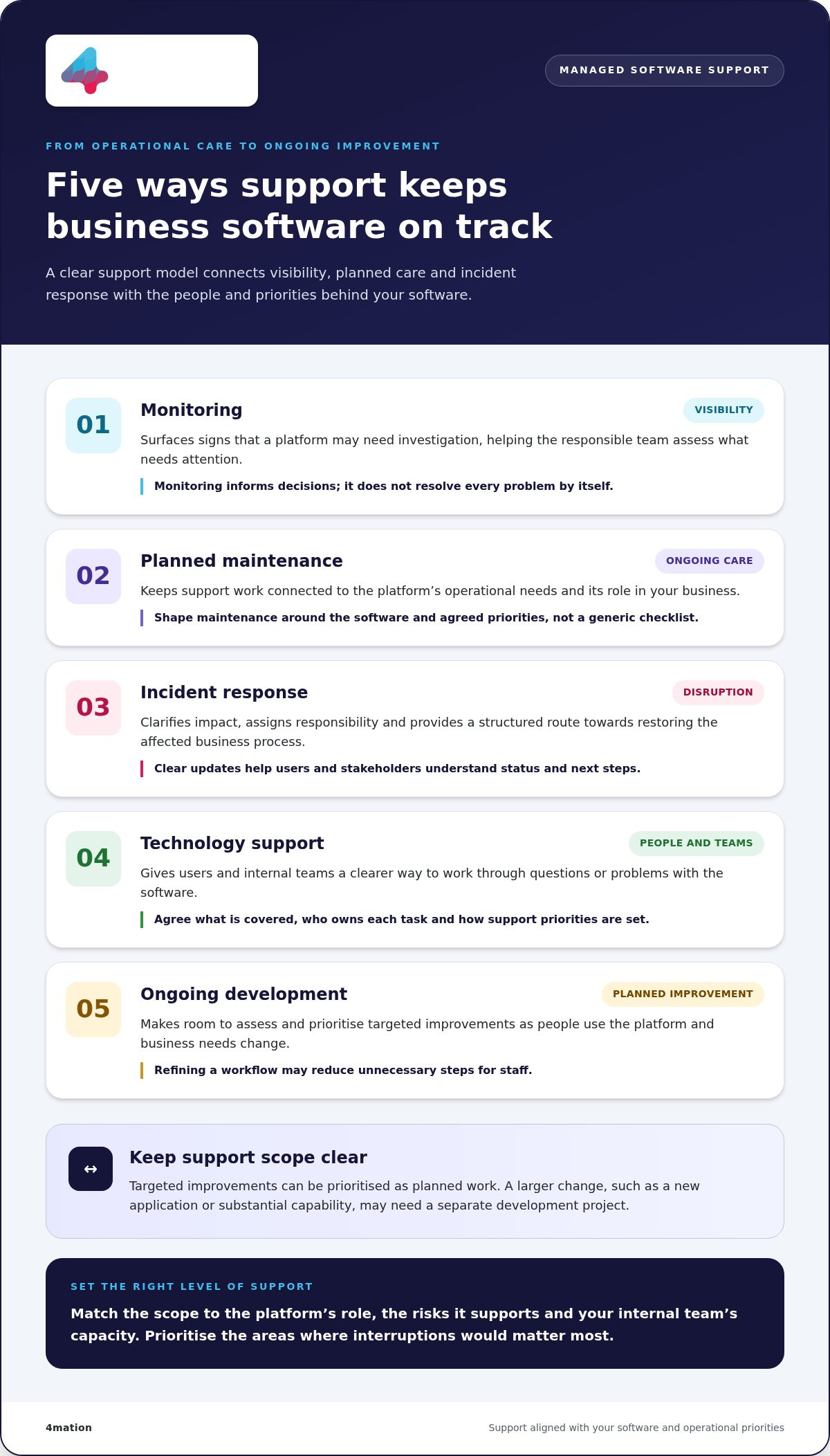
Support can include monitoring software operation, carrying out planned maintenance and responding when an incident affects users or business processes. Monitoring can surface signs of an issue for investigation. Incident response provides a structured way to assess impact, work towards resolution and communicate next steps. Neither removes all risk, but both can help your organisation respond with greater clarity.
The right scope depends on the platform and its role in your business. A system supporting a core workflow may need different oversight from an application used occasionally by a small group. Agree priorities to direct support effort towards the areas where interruptions would matter most. 4mation provides technology support and maintenance as part of this ongoing approach.
Why does support matter after software goes live?
Launch marks the start of software in active use, not the end of its lifecycle. Teams refine processes, customer expectations shift, and users identify friction that may not have been apparent during development. Regular support gives you a way to assess these needs, address operational issues and consider improvements without treating every change as a disconnected project.
Reliable software helps staff complete work with fewer interruptions and gives customers a more consistent experience. If an application used to process requests becomes unavailable, for example, staff may need manual workarounds while customers wait for an update. A support model clarifies how the issue is reported and handled. Planned maintenance helps keep the application aligned with current business needs.
Reliable software supports operational continuity by helping people carry out essential work with fewer avoidable interruptions. That makes support a business decision as well as a technical one. Connecting day-to-day assistance with maintenance and improvement helps keep software aligned with the work it is meant to enable.
What managed software support services can include
The right support scope depends on what your software needs to do. Some organisations need a dependable route for user issues and faults. Others also need planned maintenance and a way to progress improvements as priorities change. Managed software support services can coordinate these activities rather than treating every need as a separate request.
Each activity serves a distinct operational purpose. Monitoring helps identify issues that may need attention. Maintenance supports the software’s ongoing operation. Incident response focuses on disruptions, while technology support helps users and internal teams work through questions or problems. Agreeing how these responsibilities fit together makes it easier to set priorities and understand what happens next.
How monitoring, maintenance and incident response work together
Monitoring provides visibility. It can surface signs that a platform needs investigation, giving the responsible team information to assess before an issue affects more users. Monitoring doesn’t resolve every problem by itself. It supports timely decisions about what needs attention.
Maintenance is planned care for the platform. It may involve reviewing operational needs, addressing identified issues and keeping support work aligned with the software’s role in your business. Activities should reflect the platform and agreed priorities, not a generic checklist.
Incident response is the route through an active disruption. It helps clarify the impact, assign responsibility and work towards restoring the affected business process. If staff can’t complete a key task in an application, for example, a response process helps them report the problem and gives the support team a basis for investigation. Clear communication keeps users and stakeholders informed about status and next steps.
When support needs to include ongoing development
Ongoing development can address targeted needs that emerge as people use the platform. Refining an existing workflow, for example, may reduce unnecessary steps for staff. These improvements can be assessed and prioritised as planned work. They aren’t automatic outcomes of having support in place.
A larger change, such as building a new application or adding a substantial capability, may need to be managed as a separate development project. Distinguishing this work helps your organisation plan effort and decide what belongs in ongoing support and what needs its own scope. 4mation’s ongoing platform maintenance provides a foundation for addressing operational needs over time.
4mation’s Service Desk brings technology support together with ongoing development. It provides a practical way to handle current needs while considering improvements that support your business priorities. We work with your team to discuss and prioritise work, directing effort towards changes that matter to users and operations.
If you’re considering how these activities should fit together, you can discuss your software support needs with 4mation and explore an approach suited to your platform and priorities.
Managed software support versus ad hoc fixes and internal support
Choosing a support model is a question of fit, not a contest with one universal winner. Consider how important the software is to daily operations, how often it needs attention and what capacity your internal team can provide. Managed software support services offer ongoing ownership and planned capacity, while ad hoc fixes and internal support can suit other needs.
| Support model | Ownership | Continuity | Improvement capacity |
|---|---|---|---|
| Ad hoc fixes | Work is arranged when an issue arises. | Support is generally tied to individual requests. | Improvements may be handled separately or deferred. |
| Internal support | Your organisation directs and delivers the work. | Continuity depends on team capacity and knowledge. | Internal priorities compete for available time. |
| Managed support | Responsibilities are agreed with an external partner. | Ongoing support can provide a consistent working relationship. | Planned capacity can make room for prioritised improvements. |
When is ad hoc software support enough?
Occasional help may suit you when support needs are infrequent, the software has a limited operational role, or your team can manage routine oversight. A one-off repair or defined development project can also work well when there’s a clear problem to solve and no ongoing support requirement—similarly to how small businesses and home offices rely on Aspire Computing for targeted computer repairs and technical assistance.
The trade-off is that reactive work doesn’t provide the same planned continuity. Each request may need its own assessment and arrangement, and recurring issues can remain separate events rather than inform a broader support plan. That may be acceptable for low-impact systems. For software central to daily work, consider whether coordinating help and resolving repeat problems is taking manageable effort.
How can managed support work alongside your internal team?
An external partner needn’t take over internal decision-making. Your business leaders and technology team retain ownership of priorities, approvals and the outcomes the software should support. A partner can add technical capacity, assist with operational support and help progress agreed work when internal resources are stretched.
Set clear boundaries together: who assesses incoming requests, who approves changes, how work is prioritised and how progress is communicated. For example, your operations lead might identify a workflow causing delays, while your technology lead assesses the change and approves the approach. The partner can then contribute development capacity under that direction. This keeps business context and authority within your organisation while making specialist support available.
4mation’s continuous improvement and development can support planned work alongside ongoing assistance. If you’re weighing up how external support could complement your team, you can discuss your support model with 4mation.
An agreed support model can extend your internal team’s capacity while leaving business priorities and decisions in your hands.
How to establish and measure managed software support
A useful support arrangement starts with a clear picture of what your software does for the business and where support is needed. This baseline helps you set priorities, define ownership and judge whether managed software support services contribute to operational goals. Work through these steps with your internal stakeholders and support team.
Align the service with business needs
- Map software and critical workflows. Record the applications and platforms in scope, who uses them and which business processes depend on them. Identify workflows where disruption could affect staff productivity, customer experience or daily operations.
- Document the current state. Capture known issues, recurring workarounds, key dependencies and relevant access needs. Note where system knowledge sits, including internal owners who can explain how the software supports the business.
- Agree responsibilities and escalation paths. Clarify who logs and assesses issues, who investigates them, and who approves changes that affect business processes. Set out how urgent matters are raised and how the right internal decision-maker is involved.
- Set priorities and communication expectations. Distinguish operational faults from improvement requests, and agree how competing needs are assessed. Decide what updates stakeholders need and how often to review the support relationship. Make these arrangements specific to your organisation rather than relying on assumed service levels.
- Choose measures and establish a baseline. Select indicators that connect support work to the outcomes you care about. Use current information where available to understand the starting point, then review trends over time rather than treating one report as a verdict.
Measure usefulness, not just activity
A count of tickets or completed tasks can show workload, but it won’t necessarily tell you whether support is helping the business. Pair activity reporting with measures that reveal operational impact. Choose measures that reflect the software, agreed scope and business priorities.
- Issue patterns: Review the types of issues raised and whether particular problems recur. This can help identify areas for investigation or further planning.
- Operational continuity: Consider how disruptions affect important workflows and whether the support process helps teams resume work clearly.
- User experience and productivity: Track feedback or recurring points of friction to see where software support may be affecting how people complete tasks.
- Improvement progress: Review agreed improvement items, decisions made and work completed, connecting each item to the need it was intended to address.
Use review conversations to interpret measures together. A rise in reported issues, for example, may point to a recurring fault or reflect better reporting. Context helps you decide whether to investigate, adjust priorities or plan further work.
4mation works with you to align support activity with business priorities. Discuss how to establish and measure software support around your organisation’s assets, workflows and goals.
How 4mation partners with you on managed software support
Once you’ve identified the software that matters, the next decision is how to keep it supported in a way that fits your business. 4mation works with you to understand your goals, users and operational challenges before shaping a support approach. This context connects technical work to what your organisation needs its software to do.
A business-first approach to ongoing technology support
Support starts with understanding where software fits into your operations. We work with your team to identify the platforms in scope, the workflows they enable and the problems that need attention. This gives both sides a shared basis for setting priorities and agreeing responsibilities, rather than treating every request as an isolated technical task.
4mation’s Service Desk combines technology support with ongoing development. “Technology insurance” describes the value of having continuing support alongside planned development. It isn’t a promise that issues won’t occur. It reflects an ongoing partnership for support needs and improvement work.
4mation provides technology support alongside proactive monitoring, maintenance and incident response. Monitoring can identify issues that warrant investigation, maintenance supports the platform over time, and incident response provides a way to address disruption. Together, these activities give your team clearer ownership and a considered way to manage software needs.
4mation uses an Australian-led delivery model and works collaboratively with your internal stakeholders. Your organisation retains its decision-making role: your team sets business priorities and provides direction, while the support relationship provides a framework for discussing and progressing technical work.
Support that can evolve with your software
Your platform’s purpose and users may change as your organisation develops. Ongoing development can address these needs through prioritised changes to existing software, based on operational value and the work involved. This lets you consider improvements alongside ongoing support, while keeping larger development initiatives distinct when they need separate planning and scope.
For example, staff may find that a step in an established workflow creates avoidable friction. Your team can assess its importance, agree whether it should be prioritised, and plan suitable development work. The decision stays tied to a business need, not simply to the availability of a technical change.
4mation brings 25 years of client success, as stated on its About page, to its work supporting software across its lifecycle. That experience informs a steady, collaborative approach to maintaining and developing important platforms. The Service Desk connects day-to-day technology support with ongoing development, so the relationship can respond as operational needs evolve.
If you’re considering how managed software support services could fit your organisation, 4mation’s Service Desk provides a starting point for understanding this combined model.
Discuss your software support needs with 4mation.
Make support part of your software’s future
Your support model can do more than respond to faults. It can help your organisation decide which software needs attention, where internal capacity is best used and how to keep platforms aligned with changing business priorities.
Start by identifying one business-critical system and the outcomes it needs to support. Then shape managed software support services around the software, your team’s capability and the work that matters most. The aim isn’t to add complexity. It’s to give support clear ownership and a practical path for ongoing care and improvement.
4mation works with Australian organisations to connect software support with operational needs. A conversation can help clarify an approach suited to your business, without assuming every organisation needs the same model.
Plan your next step with 4mation and take a considered approach to keeping your important software useful and dependable.
Frequently Asked Questions
What is included in managed software support services?
Managed software support services cover the activities agreed for the software and the organisation using it. Scope may include technical assistance, maintenance, monitoring, incident handling and planned development. An application fault could be handled as a support issue, while a request to change an approval workflow may need assessment as improvement work. Defining these boundaries helps your team understand what’s covered and how to raise different requests.
How are managed software support services different from a service desk?
Managed support describes an ongoing arrangement for looking after software, while a service desk is commonly the point or model through which support requests are coordinated. The terms can overlap, depending on how a service is structured. At 4mation, the Service Desk combines technology support with ongoing development, bringing operational requests and planned work into a continuing relationship rather than treating them as unrelated engagements.
Can managed software support work alongside an internal IT team?
Yes. Your internal team can retain responsibility for business context, priorities and approvals while a support partner contributes technical capacity. An internal product owner might decide which user request matters most, for instance, while the partner assesses the software change and carries out agreed work. A shared record of decisions and system knowledge helps the internal team stay informed and reduces reliance on informal handovers.
How should a business prioritise software support requests?
Rank requests by their effect on business operations, the number of users or processes affected, and whether a practical workaround exists. A fault blocking a core task may take precedence over a minor display issue, while an improvement request can be assessed against its expected value and effort. Ask requesters to describe the impact, not just the technical symptom, so decisions reflect business needs.
What should an organisation define in a software support agreement?
Set out which software and activities are covered, how users raise requests, who assesses and approves work, and how incidents are escalated. Clarify how changes outside the agreed support scope are handled, along with access arrangements, reporting and review discussions. These details help prevent assumptions, especially when internal teams and an external partner share responsibility for a platform.
How can a business measure the value of managed software support?
Compare support activity with business effects, not just the number of requests closed. Pair recurring-issue trends with feedback from staff who rely on the affected workflow, or review whether prioritised improvements address the problems they were intended to solve. Use an agreed starting point and interpret changes in context: more reports may indicate a recurring fault or more consistent reporting.
About The Author
